 James' CS Book
Redis Explained
What is Redis?
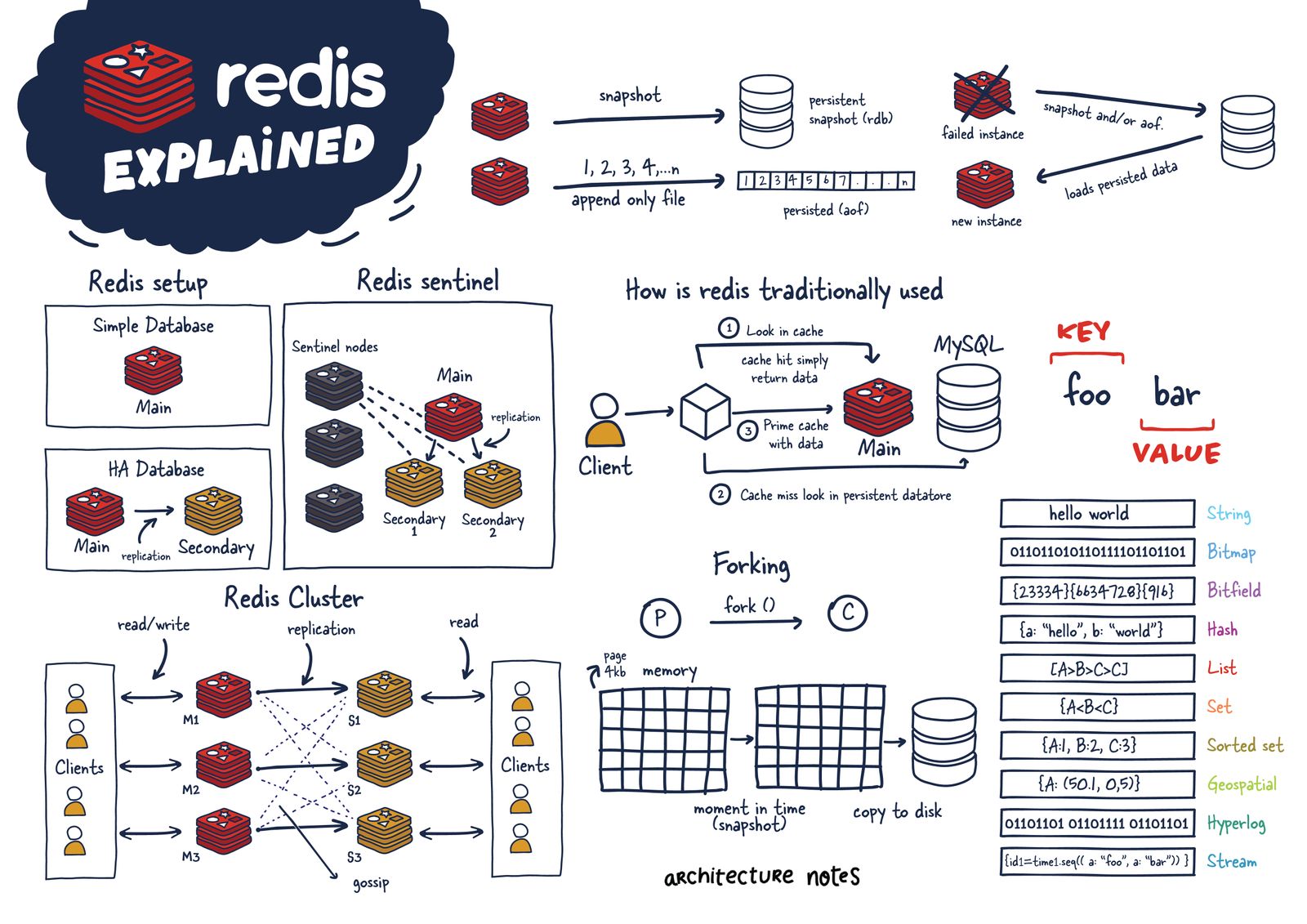
Redis (“REmote DIctionary Service”) is an open-source key-value database server.
The most accurate description of Redis is that it's a data structure server. This specific nature of Redis has led to much of its popularity and adoption amongst developers.
Rather than iterating over, sorting, and ordering rows, what if the data was in data structures you wanted from the ground up? Early on, it was used much like Memcached, but as Redis improved, it became viable for many other use cases, including publish-subscribe mechanisms, streaming, and queues.
Primarily, Redis is an in-memory database used as a cache in front of another "real" database like MySQL or PostgreSQL to help improve application performance. It leverages the speed of memory and alleviates load off the central application database for:
- Data that changes infrequently and is requested often
- Data that is less mission-critical and is frequently evolving.
- Examples of above data can include session or data caches and leaderboard or roll-up analytics for dashboards.

However, for many use cases, Redis offers enough guarantees that it can be used as a full-fledged primary database. Coupled with Redis plug-ins and its various High Availability (HA) setups, Redis as a database has become incredibly useful for certain scenarios and workloads.
Another important aspect is that Redis blurred the lines between a cache and datastore. Important note to understand here is that reading and manipulating data in memory is much faster than anything possible in traditional datastores using SSDs or HDDs.
 Important latency and bandwidth numbers every software engineer to should be aware of.
Originally Redis was most commonly compared to Memcached, which lacked any nonvolatile persistence at the time.
Memcached
Memcached was created by Brad Fitzpatrick in 2003, predating Redis by six years. It originally started as a Perl project and was later rewritten in C. It was the de facto caching tool of its day. The main differentiating point between it and Redis is its lack of data types and its limited eviction policy of just LRU (least recently used).
Another difference is that Redis is single-threaded while Memcached is multithreaded. Memcached might be performant in a strictly caching environment but requires some setup in a distributed cluster, while Redis has support for this out of the box.
| Feature | Memcached | Redis |
|---|---|---|
| Sub-millisecond latency | Yes | Yes |
| Developer ease of use | Yes | Yes |
| Data partitioning | Yes | Yes |
| Support for a broad set of programming languages | Yes | Yes |
| Advanced data structures | - | Yes |
| Multithreaded architecture | Yes | - |
| Snapshots | - | Yes |
| Replication | - | Yes |
| Transactions | - | Yes |
Although now configurable in how it persists data to disk, when it was first introduced, Redis used snapshots where asynchronous copies of the data in memory were persisted to disk for long-term storage. Unfortunately, this mechanism has the downside of potentially losing your data between snapshots.
Redis Architecture
Before we start discussing Redis internals, let's discuss the various Redis deployments and their trade-offs.
We will be focusing mainly on these configurations:
- Single Redis Instance
- Redis HA
- Redis Sentinel
- Redis Cluster
Depending on your use case and scale, you can decide to use one setup or another.
Single Redis Instance
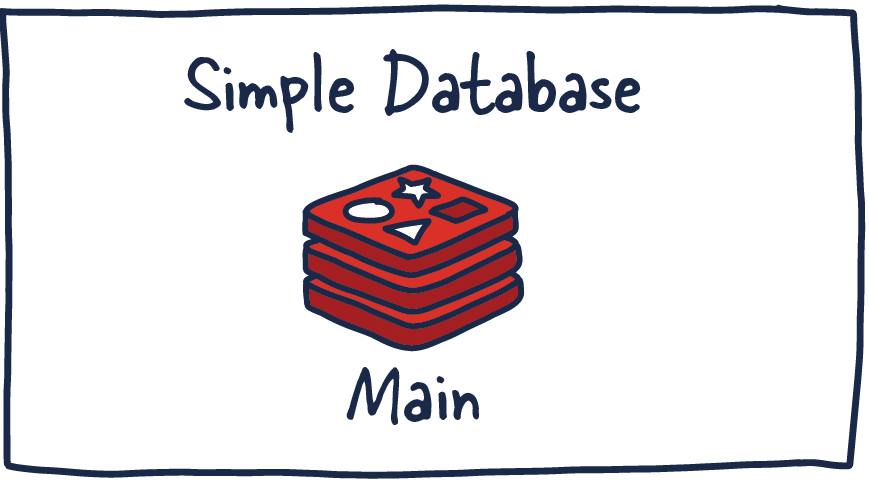
Single Redis instance is the most straightforward deployment of Redis. It allows users to set up and run small instances that can help them grow and speed up their services. However, this deployment isn't without shortcomings. For example, if this instance fails or is unavailable, all client calls to Redis will fail and therefore degrade the system's overall performance and speed.
Given enough memory and server resources, this instance can be powerful. A scenario primarily used for caching could result in a significant performance boost with minimal setup. Given enough system resources, you could deploy this Redis service on the same box the application is running.
Understanding a few Redis concepts on managing data within the system is essential. Commands sent to Redis are first processed in memory. Then, if persistence is set up on these instances, there is a forked process on some interval that facilitates data persistence RDB (very compact point-in-time representation of Redis data) snapshots or AOF (append-only files).
These two flows allow Redis to have long-term storage, support various replication strategies, and enable more complicated topologies. If Redis isn't set up to persist data, data is lost in case of a restart or failover. If the persistence is enabled on a restart, it loads all of the data in the RDB snapshot or AOF back into memory, and then the instance can support new client requests.
With that said, let us look into more distributed Redis setups you might want to use.
Redis HA
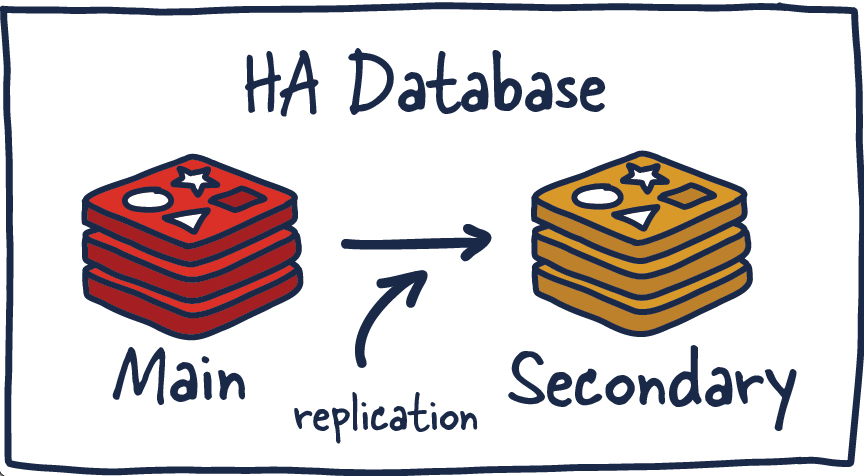
Another popular setup with Redis is the main deployment with a secondary deployment that is kept in sync with replication. As data is written to the main instance it sends copies of those commands, to a replica client output buffer for secondary instances which facilitates replication. The secondary instances can be one or more instances in your deployment. These instances can help scale reads from Redis or provide failover in case the main is lost.
High Availability
High availability (HA) is a characteristic of a system that aims to ensure an agreed level of operational performance, usually uptime, for a higher than average period.
In these HA systems, it is essential to not have a single point of failure so systems can recover gracefully and quickly. This results in reliable crossover, so data isn't lost during the transition from primary to secondary, in addition to automatically detecting failure and recovery from it.
There are several new things to consider in this topology since we have now entered a distributed system that has many fallacies you need to consider. Things that were previously straightforward are now more complex.
Redis Replication
Every main instance of Redis has a replication ID and an offset. These two pieces of data are critical to figure out a point in time where a replica can continue its replication process or to determine if it needs to do a complete sync. This offset is incremented for every action that happens on the main Redis deployment.
Replication ID, offsetReplication ID, offsetMore explicitly, when the Redis replica instance is just a few offsets behind the main instance, it receives the remaining commands from the primary, which is then replayed on its dataset until it is in sync. If the two instances cannot agree on a replication ID or the offset is unknown to the main instance, the replica will then request a full synchronization. This involves a primary instance creating a new RDB snapshot and sending it over to the replica. While this transfer is happening, the main instance is buffering all the intermediate updates between the snapshot cut-off and current offset to send to the secondary once it is in sync with the snapshot. Once complete, replication can continue as normal.
If an instance has the same replication ID and offset, they have precisely the same data. Now you may be wondering why a replication ID is required. When a Redis instance is promoted to primary or restarts from scratch as a primary, it is given a new replication ID. This is used to infer the prior primary instance from which this newly promoted secondary was replicating. This allows for the ability to perform a partial synchronization (with other secondaries) since the new primary instance remembers its old replication ID.
For example, two instances, primary and secondary, have the identical replication ID but offsets that differ by a few hundred commands, meaning that if those were replayed on the instance that is just behind in offset, they would have the same dataset. Now if the replication IDs differ entirely, and when we are unaware of the previous replication ID (no common ancestor) of the newly demoted (and rejoining) secondary. We will need to perform an expensive full sync.
Alternatively if we are aware of previous replication ID we can then reason about how to get the data in sync since we are able to reason about common ancestor they both shared and the offset is again meaningful for a partial sync.
Redis Sentinel
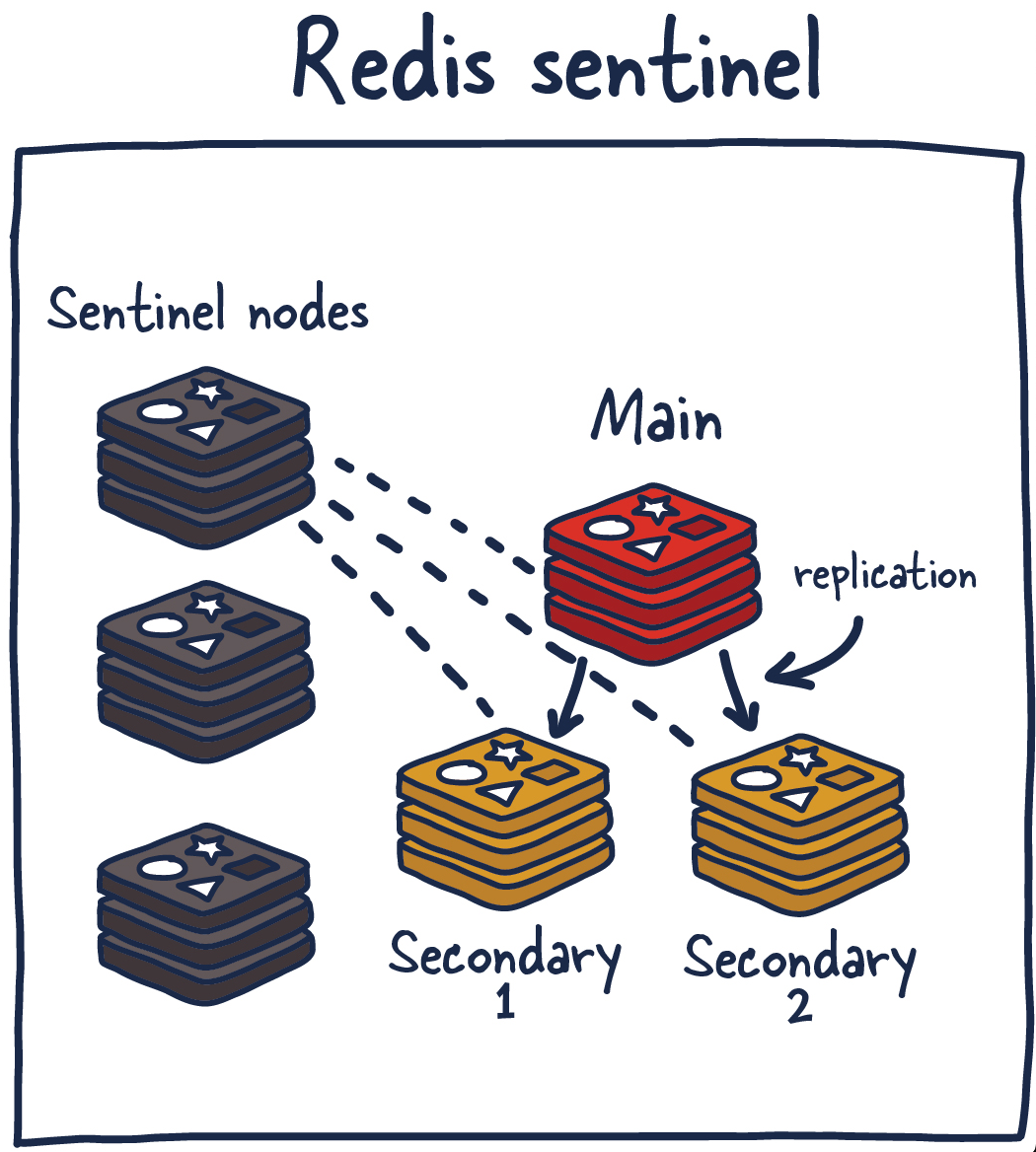
Sentinel is a distributed system. As with all distributed systems, Sentinel comes with several advantages and disadvantages. Sentinel is designed in a way where there is a cluster of sentinel processes working together to coordinate state to provide high availability for Redis. Afterall you wouldn't want the system protecting you from failure to have its own single point of failure.
Sentinel is responsible for a few things. First, it ensures that the current main and secondary instances are functional and responding. This is necessary because sentinel (with other sentinel processes) can alert and act on situations where the main and/or secondary nodes are lost. Second, it serves a role in service discovery much like Zookeeper and Consul in other systems. So when a new client attempts to write something to Redis, Sentinel will tell the client what current main instance is.
So sentinels are constantly monitoring availability and sending out that information to clients so they are able to react to them if they indeed do failover.
Here are its responsibilities:
- Monitoring — ensuring main and secondary instances are working as expected.
- Notification — notify system admins about occurrences in the Redis instances.
- Failover management — Sentinel nodes can start a failover process if the primary instance isn't available and enough (quorum of) nodes agree that is true.
- Configuration management — Sentinel nodes also serve as a point of discovery of the current main Redis instance.
Using Redis Sentinel in this way allows for failure detection. This detection involves multiple sentinel processes agreeing that current main instance is no longer available. This agreement process is called Quorum. This allows for increased robustness and protection against one machine misbehaving and being unable to reach the main Redis node.
Quorum
A quorum is the minimum number of votes that a distributed system has to obtain in order to be allowed to perform an operations like failover. This number is configurable, but should be reflective of the number of nodes in said distributed system. Most distributed systems have sizes of three or five with quorums of two and three respectively. Odd number of nodes is preffered in cases the system is required to break ties.
This setup isn't without its disadvantages so we are going to run through a few recommendations and best practices when using Redis Sentinel.
You can deploy Redis Sentinel in several ways. Honestly to make any sane recommendation I would need more context than I currently have about your system. As general guidance I would recommend running a sentinel node along aside each of your application servers (if possible) so you also don't need to factor in network reachability differences between sentinel nodes and clients who are actually using Redis.
You can run Sentinel alongside the Redis instances or even on independent nodes, but that complicates things in different ways. I recommend at least running three nodes with a quorum of at least two. Here is a simple chart breaking down numbers of servers in a cluster and associated quorum and tolerated failures that are sustainable.
| Number of Servers | Quorum | Number Of Tolerated Failures |
|---|---|---|
| 1 | 1 | 0 |
| 2 | 2 | 0 |
| 3 | 2 | 1 |
| 4 | 3 | 1 |
| 5 | 3 | 2 |
| 6 | 4 | 2 |
| 7 | 4 | 3 |
| Replication | - | Yes |
| Transactions | - | Yes |
Table of number of servers and quorum with number of tolerated failures.
This will vary from system to system but general idea stands.
Let's take a moment to think through what could go wrong in such a setup. If you run this system long enough, you will run into all of them.
- What if the sentinel nodes fall out of quorum?
- What if there is a network split which puts the old main instance in the minority group? What happens to those writes? (Spoiler: they are lost when the system recovers fully)
- What happens if the network topologies of sentinel nodes and client nodes (application nodes) are misaligned? 😬
There are no durability guarantees, especially since persistence (see below) to disk is asynchronous. There is also the nagging problem of when clients find out about new primaries, how many writes did we lose to an unaware primary? Redis recommends that when new connections are established that they should query for the new primary. Depending on the system configuration, that could mean a significant data loss.
There are a few ways to mitigate the level of losses if you force the main instance to replicate writes to a minimum of one secondary instance. Remember, all Redis replication is asynchronous and has its trade-offs. So it will need to independently track acknowledgement and if they aren't confirmed by at least one secondary, the main instance will stop accepting writes.
Redis Cluster

I am sure many have thought about what happens when you can't store all your data in memory on one machine. Currently, the maximum RAM available in a single server is 24TIB, presently listed online at AWS. Granted, that's a lot, but for some systems, that isn't enough, even for a caching layer.
Redis Cluster allows for the horizontal scaling of Redis.
Vertical and Horizontal Scaling
As your systems grow, you have three options.
- Do less (No one does this entirely because we are insatiable monsters).
- Scale up.
- Scale out.
Taking the latter two seriously, scaling up and scaling out are known as vertical and horizontal scaling, respectively. Vertical scaling is a technique where you get bigger and better machines to do the work faster and hope all your problems scale well with your hardware. Even if this is possible, you will eventually be limited by the hardware you use.
Once you reach that point (more likely and hopefully way before), you will need to scale your system horizontally by spreading the workload across multiple smaller machines responsible for smaller parts of the whole.
So let's get some terminology out of the way; once we decide to use Redis Cluster, we have decided to spread the data we are storing across multiple machines, known as sharding. So each Redis instance in the cluster is considered a shard of the data as a whole.
This brings about a new problem. If we push a key to the cluster, how do we know which Redis instance (shard) is holding that data? There are several ways to do this, but Redis Cluster uses algorithmic sharding.
To find the shard for a given key, we hash the key and mod the total result by the number of shards. Then, using a deterministic hash function, meaning that a given key will always map to the same shard, we can reason about where a particular key will be when we read it in the future.
What happens when we later want to add a new shard into the system? This process is called resharding.
Assuming the key foo was mapped to shard zero after introducing a new shard, it may map to shard five. However, moving data around to reflect the new shard mapping would be slow and unrealistic if we need to grow the system quickly. It also has adverse effects on the availability of the Redis Cluster.
Redis Cluster has devised a solution to this problem called Hashslot, to which all data is mapped. There are 16K hashslot. This gives us a reasonable way to spread data across the cluster, and when we add new shards, we simply move hashslots across the systems. By doing this, we just need to move hashlots from shard to shard and simplify the process of adding new primary instances into the cluster.
This is possible without any downtime, and minimal performance hit. Let's talk through an example.
M1 contains hashslots from 0 to 8191.
M2 contains hashslots from 8192 to 16383.
So to map foo, we take a deterministic hash of the key (foo) and mod it by the number of hash slots(16K), leading to a mapping of M2. Now let's say we add a new instance, M3. The new mappings would be
M1 contains hashslots from 0 to 5460.
M2 contains hashslots from 5461 to 10922.
M3 contains hashslots from 10923 to 16383.
All the keys that mapped the hashslots in M1 that are now mapped to M2 would need to move. But the hashing for the individual keys to hashslots wouldn't need to move because they have already been divided up across hashslots. So this one level of misdirection solves the resharding issue with algorithmic sharding.
Gossiping
Redis Cluster uses gossiping to determine the entire cluster's health. In the illustration above, we have 3 M nodes and 3 S nodes. All these nodes constantly communicate to know which shards are available and ready to serve requests. If enough shards agree that M1 isn't responsive, they can decide to promote M1's secondary S1 into a primary to keep the cluster healthy. The number of nodes needed to trigger this is configurable, and it is essential to get this right. If you do it improperly, you can end up in situations where the cluster is split if it cannot break the tie when both sides of a partition are equal. This phenomenon is called split brain. As a general rule, it is essential to have an odd number of primary nodes and two replicas each for the most robust setup.
Redis Persistence Models
If we are going to use Redis to store any kind of data for safe keeping, it's important to understand how Redis is doing it. There are many usecases where if you were to lose the data Redis is storing is not the end of the world. Using it as a cache or in situations where its powering real-time analytics where if data loss occurs its no the end of the world.
In other scenarios, we want to have some guarantees around data persistence and recovery.

No persistence
No persistence: If you wish, you can disable persistence altogether. This is the fastest way to run Redis and has no durability guarantees.
Redis Database Files
RDB (Redis Database): The RDB persistence performs point-in-time snapshots of your dataset at specified intervals.
The main downside to this mechanism is that data between snapshots will be lost. In addition, this storage mechanism also relies on forking the main process, and in a larger dataset, this may lead to a momentary delay in serving requests. That being said, RDB files are much faster being loaded in memory than AOF.
Append Only File
AOF (Append Only File): The AOF persistence logs every write operation the server receives that will be played again at server startup, reconstructing the original dataset.
This way of ensuring persistence is much more durable than RDB snapshots since it is an append-only file. As operations happen, we buffer them to the log, but they aren't persisted yet. This log consistents of the actual commands we ran in order for replay when needed.
Then when possible, we flush it to disk with fsync (when this runs is configurable), it will be persisted. The downside is that the format isn't compact and uses more disk than RDB files.
fsync
fsync() transfers ("flushes") all modified in-core data of (i.e., modified buffer cache pages for) the file referred to by the file descriptor fd to the disk device (or other permanent storage device) so that all changed information can be retrieved even if the system crashes or is rebooted.
For various, reasons when changes are made to file they are done to caches and calls to fsync() ensure they are persisted to disk and accessible later.
Why not both?
RDB + AOF: It is possible to combine AOF and RDB in the same Redis instance. If durability in exchange for some speed is a tradeoff, you are willing to make it. I think this is an acceptable way to set up Redis. In the case of a restart, remember that if both are enabled, Redis will use AOF to reconstruct the data since it's the most complete.
Forking
Now that we understand the types of persistence, let’s discuss how we actually go about doing it in a single threaded application like Redis.
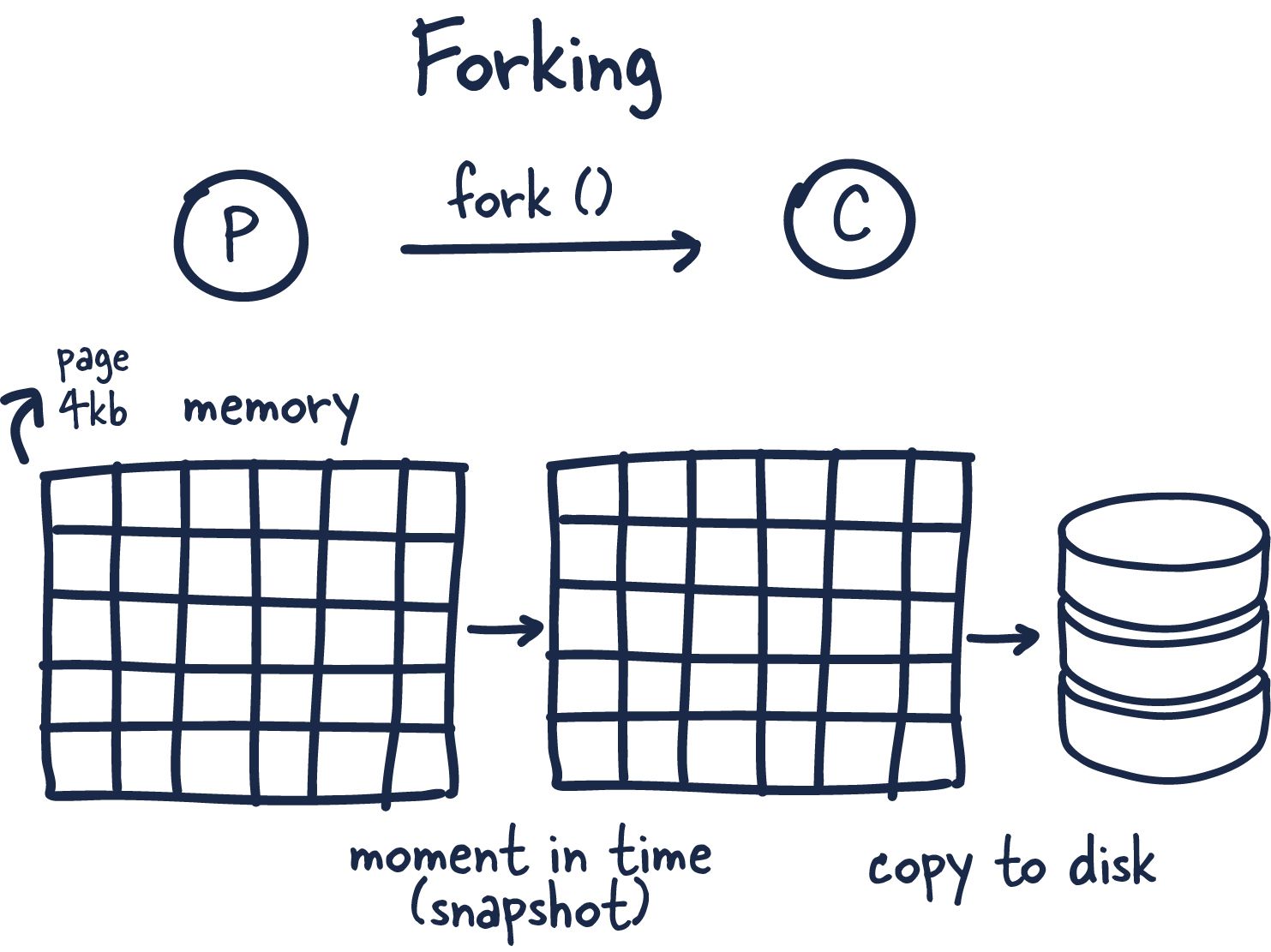
This coolest part of Redis in my opinion is how it leverages forking and copy-on-write to facilitate data persistence performantly.
Forking is a way for operating systems to create new processes by creating copies of themselves. With this, you get a new process ID and a few other bits of information and handles, so the newly forked process (child) can talk to the original process parent.
Now here is where things get interesting. Redis is a process with tons of memory allocated to it, so how does it make a copy without running out of memory?
When you fork a process, the parent and child share memory, and in that child process Redis begins the snapshotting (Redis) process. This is made possible by a memory sharing technique called copy-on-write —which passses references to the memory at the time the fork was created. If no changes occur while the child process is persisting to disk, no new allocations are made.
In the case where there are changes, the kernel keeps track of references to each page, and if there are more than one to specific page the changes are written to new pages. The child process is fully unaware of the change and has consistent memory snapshot. Therefore only fraction of the memory is used and we are able to achieve a point in time snapshot of potentially gigabytes of memory extremely quickly and efficiently!
Interview Questions
Redis offers a great deal of support for developing efficient caching mechanisms. It takes only a couple of minutes to implement a cache mechanism and get it working with any application. Follow along to learn 25 most common Redis Interview Questions and Answers for your next senior web developer interview.
Q1: What is Redis?
Redis, which stands for Remote Dictionary Server, is a fast, open-source, in-memory key-value data store for use as a database, cache, message broker, and queue.
You can run atomic operations, like appending to a string; incrementing the value in a hash; pushing an element to a list; computing set intersection, union and difference; or getting the member with highest ranking in a sorted set.
In order to achieve performance, Redis works with an in-memory dataset. Depending on your use case, you can persist it either by dumping the dataset to disk every once in a while, or by appending each command to a log. Persistence can be optionally disabled, if you just need a feature-rich, networked, in-memory cache.
Redis is a popular choice for caching, session management, gaming, leaderboards, real-time analytics, geospatial, ride-hailing, chat/messaging, media streaming, and pub/sub apps.
Q2: Is Redis just a cache?
Like a cache Redis offers:
- in memory key-value storage
But unlike a cache, Redis:
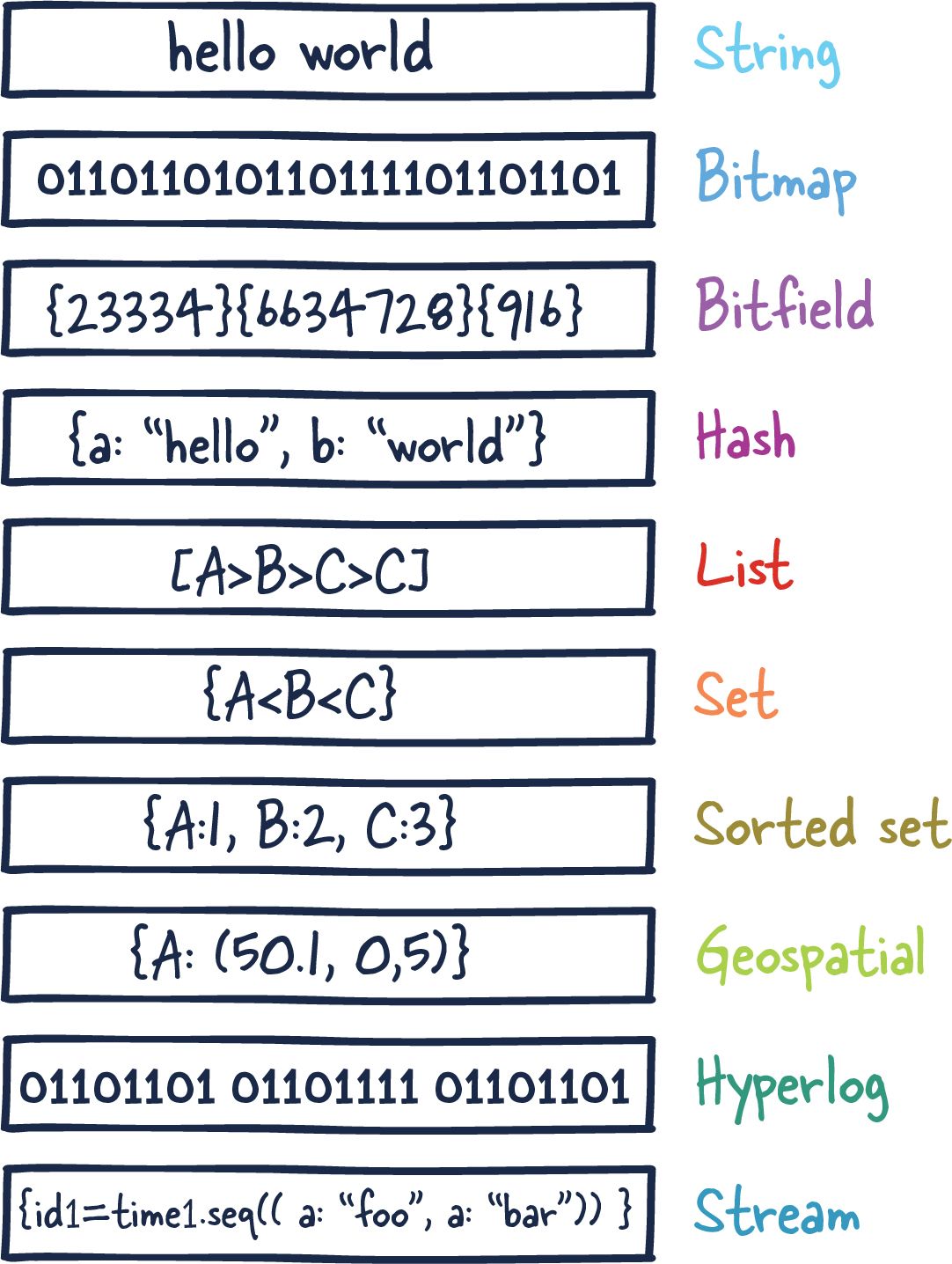
- Supports multiple datatypes (strings, hashes, lists, sets, sorted sets, bitmaps, and hyperloglogs)
- It provides an ability to store cache data into physical storage (if needed).
- Supports pub-sub model
- Redis cache provides replication for high availability (master/slave)
- Supports ultra-fast lua-scripts. Its execution time equals to C commands execution.
Q3: Does Redis persist data?
Redis supports so-called "snapshots". This means that it will do a complete copy of whats in memory at some points in time (e.g. every full hour). When you lose power between two snapshots, you will lose the data from the time between the last snapshot and the crash (doesn't have to be a power outage..). Redis trades data safety versus performance, like most NoSQL-DBs do.
Redis saves data in one of the following cases:
- automatically from time to time
- when you manually call
BGSAVEcommand - when redis is shutting down
But data in redis is not really persistent, because:
- crash of redis process means losing all changes since last save
BGSAVEoperation can only be performed if you have enough free RAM (the amount of extra RAM is equal to the size of redis DB)
Q4: What's the advantage of Redis vs using memory?
Redis is a remote data structure server. It is certainly slower than just storing the data in local memory (since it involves socket roundtrips to fetch/store the data). However, it also brings some interesting properties:
Redis can be accessed by all the processes of your applications, possibly running on several nodes (something local memory cannot achieve).
Redis memory storage is quite efficient, and done in a separate process. If the application runs on a platform whose memory is garbage collected (node.js, java, etc ...), it allows handling a much bigger memory cache/store. In practice, very large heaps do not perform well with garbage collected languages.
Redis can persist the data on disk if needed.
Redis is a bit more than a simple cache: it provides various data structures, various item eviction policies, blocking queues, pub/sub, atomicity, Lua scripting, etc ...
Redis can replicate its activity with a master/slave mechanism in order to implement high-availability.
Basically, if you need your application to scale on several nodes sharing the same data, then something like Redis (or any other remote key/value store) will be required.
Q5: When to use Redis Lists data type?
Redis lists are ordered collections of strings. They are optimized for inserting, reading, or removing values from the top or bottom (aka: left or right) of the list.
Redis provides many commands for leveraging lists, including commands to push/pop items, push/pop between lists, truncate lists, perform range queries, etc.
Lists make great durable, atomic, queues. These work great for job queues, logs, buffers, and many other use cases.
Q6: When to use Redis Sets?
Sets are unordered collections of unique values. They are optimized to let you quickly check if a value is in the set, quickly add/remove values, and to measure overlap with other sets.
These are great for things like access control lists, unique visitor trackers, and many other things. Most programming languages have something similar (usually called a Set). This is like that, only distributed.
Redis provides several commands to manage sets. Obvious ones like adding, removing, and checking the set are present. So are less obvious commands like popping/reading a random item and commands for performing unions and intersections with other sets.
Q7: When to use Redis over MongoDB?
It depends on kind of dev team you are and your application needs but some notes when to use Redis is probably a good idea:
- Caching
Caching using MongoDB simply doesn't make a lot of sense. It would be too slow.
- If you have enough time to think about your DB design.
You can't simply throw in your documents into Redis. You have to think of the way you in which you want to store and organize your data. One example are hashes in Redis. They are quite different from "traditional", nested objects, which means you'll have to rethink the way you store nested documents. One solution would be to store a reference inside the hash to another hash (something like key: [id of second hash]). Another idea would be to store it as JSON, which seems counter-intuitive to most people with a *SQL-background. Redis's non-traditional approach requires more effort to learn, but greater flexibility.
If you need really high performance.
Beating the performance Redis provides is nearly impossible. Imagine you database being as fast as your cache. That's what it feels like using Redis as a real database.
If you don't care that much about scaling.
Scaling Redis is not as hard as it used to be. For instance, you could use a kind of proxy server in order to distribute the data among multiple Redis instances. Master-slave replication is not that complicated, but distributing you keys among multiple Redis-instances needs to be done on the application site (e.g. using a hash-function, Modulo etc.). Scaling MongoDB by comparison is much simpler.
Q8: How are Redis pipelining and transaction different?
Pipelining is primarily a network optimization. It essentially means the client buffers up a bunch of commands and ships them to the server in one go. The commands are not guaranteed to be executed in a transaction. The benefit here is saving network round trip time for every command.
Redis is single threaded so an individual command is always atomic, but two given commands from different clients can execute in sequence, alternating between them for example.
Multi/exec, however, ensures no other clients are executing commands in between the commands in the multi/exec sequence.
Q9: Does Redis support transactions?
MULTI, EXEC, DISCARD and WATCH are the foundation of transactions in Redis. They allow the execution of a group of commands in a single step, with two important guarantees:
- All the commands in a transaction are serialized and executed sequentially. It can never happen that a request issued by another client is served in the middle of the execution of a Redis transaction. This guarantees that the commands are executed as a single isolated operation.
- Either all of the commands or none are processed, so a Redis transaction is also atomic.
Q10: How does Redis handle multiple threads (from different clients) updating the same data structure in Redis?
Redis is actually single-threaded, which is how every command is guaranteed to be atomic. While one command is executing, no other command will run.
A single-threaded program can definitely provide concurrency at the I/O level by using an I/O (de)multiplexing mechanism and an event loop (which is what Redis does). The fact that Redis operations are atomic is simply a consequence of the single-threaded event loop. The interesting point is atomicity is provided at no extra cost (it does not require synchronization between threads).
Q11: What is the difference between Redis replication and sharding?
- Sharding, also known as partitioning, is splitting the data up by key. Sharding is useful to increase performance, reducing the hit and memory load on any one resource.
- While replication, also known as mirroring, is to copy all data. Replication is useful for getting a high availability of reads. If you read from multiple replicas, you will also reduce the hit rate on all resources, but the memory requirement for all resources remains the same.
Any key-value store (of which Redis is only one example) supports sharding, though certain cross-key functions will no longer work. Redis supports replication out of the box.
Q12: When to use Redis Hashes data type?
Hashes are sort of like a key value store within a key value store. They map between string fields and string values. Field->value maps using a hash are slightly more space efficient than key->value maps using regular strings.
Hashes are useful as a namespace, or when you want to logically group many keys. With a hash you can grab all the members efficiently, expire all the members together, delete all the members together, etc. Great for any use case where you have several key/value pairs that need to grouped.
One example use of a hash is for storing user profiles between applications. A redis hash stored with the user ID as the key will allow you to store as many bits of data about a user as needed while keeping them stored under a single key. The advantage of using a hash instead of serializing the profile into a string is that you can have different applications read/write different fields within the user profile without having to worry about one app overriding changes made by others (which can happen if you serialize stale data).
Q13: Explain a use case for Sorted Set in Redis
Sorted Sets are also collections of unique values. These ones, as the name implies, are ordered. They are ordered by a score, then lexicographically.
This data type is optimized for quick lookups by score. Getting the highest, lowest, or any range of values in between is extremely fast.
If you add users to a sorted set along with their high score, you have yourself a perfect leader-board. As new high scores come in, just add them to the set again with their high score and it will re-order your leader-board. Also great for keeping track of the last time users visited and who is active in your application.
Storing values with the same score causes them to be ordered lexicographically (think alphabetically). This can be useful for things like auto-complete features.
Many of the sorted set commands are similar to commands for sets, sometimes with an additional score parameter. Also included are commands for managing scores and querying by score.
Q14: What is Pipelining in Redis and when to use one?
If you have many redis commands you want to execute you can use pipelining to send them to redis all-at-once instead of one-at-a-time.
Normally when you execute a command, each command is a separate request/response cycle. With pipelining, Redis can buffer several commands and execute them all at once, responding with all of the responses to all of your commands in a single reply.
This can allow you to achieve even greater throughput on bulk importing or other actions that involve lots of commands.
Q15: Mention what are the things you have to take care while using Redis?
- Select a consistent method to name and prefix your keys. Manage your namespace
- Create a “Registry” of key prefixes that maps each of your internal documents for that application which “own” them
- For every class you put through into your Redis infrastructure: design, implement and test the mechanisms for garbage collection or data migration to archival storage
- Design, implement and test a sharding library before you have invested much into your application deployment and make sure that you keep a registry of “shards “replicated on each server
- Separate all your K/V store and related operations into your own library/API or service
Q16: How can I exploit multiple CPU/cores for Redis?
First Redis is single threaded but it's not very frequent that CPU becomes your bottleneck with Redis, as usually Redis is either memory or network bound.
For instance, using pipelining Redis running on an average Linux system can deliver even 1 million requests per second, so if your application mainly uses O(N) or O(log n) commands, it is hardly going to use too much CPU.
However, to maximize CPU usage you can start multiple instances of Redis in the same box and treat them as different servers. At some point a single box may not be enough anyway, so if you want to use multiple CPUs you can start thinking of some way to shard earlier.
With Redis 4.0 Redis team started to make Redis more threaded. For now this is limited to deleting objects in the background, and to blocking commands implemented via Redis modules. For future releases, the plan is to make Redis more and more threaded.
Q17: What do the terms "CPU bound" and "I/O bound" mean in context of Redis?
A program is CPU bound if it would go faster if the CPU were faster, i.e. it spends the majority of its time simply using the CPU (doing calculations). A program that computes new digits of π will typically be CPU-bound, it's just crunching numbers.
A program is I/O bound if it would go faster if the I/O subsystem was faster. Which exact I/O system is meant can vary; I typically associate it with disk, but of course networking or communication in general is common too. A program that looks through a huge file for some data might become I/O bound, since the bottleneck is then the reading of the data from disk (actually, this example is perhaps kind of old-fashioned these days with hundreds of MB/s coming in from SSDs).
Memory bound means the rate at which a process progresses is limited by the amount memory available and the speed of that memory access. A task that processes large amounts of in memory data, for example multiplying large matrices, is likely to be Memory Bound.
Cache bound means the rate at which a process progress is limited by the amount and speed of the cache available. A task that simply processes more data than fits in the cache will be cache bound.
It's not very frequent that CPU becomes your bottleneck with Redis, as usually Redis is either memory or network bound.
Q18: Why Redis does not support roll backs?
Redis commands can fail during a transaction, but still Redis will execute the rest of the transaction instead of rolling back.
There are good opinions for this behavior:
- Redis commands can fail only if called with a wrong syntax (and the problem is not detectable during the command queueing), or against keys holding the wrong data type: this means that in practical terms a failing command is the result of a programming errors, and a kind of error that is very likely to be detected during development, and not in production.
- Redis is internally simplified and faster because it does not need the ability to roll back.
Q19: What is AOF persistence in Redis?
Redis AOF (Append Only Files) persistence logs every write operation received by the server, that will be played again at server startup, reconstructing the original dataset.
Redis must be explicitly configured for AOF persistence, if this is required, and this will result in a performance penalty as well as growing logs. It may suffice for relatively reliable persistence of a limited amount of data flow.
Q20: If there's a way to check if a key already exists in a redis list?
Your options are as follows:
- Using
LREMand replacing it if it was found. - Maintaining a separate
SETin conjunction with yourLIST - Looping through the
LISTuntil you find the item or reach the end.
Redis lists are implemented as a, hence the limitations. I think your best option is maintaining a duplicate SET. Regardless, make sure your actions are atomic with MULTI-EXEC or Lua scripts.
Q21: What are the underlying data structures used for Redis?
Here is the underlying implementation of every Redis data type.
- Strings are implemented using a C dynamic string library so that we don't pay (asymptotically speaking) for allocations in append operations. This way we have
O(N)appends, for instance, instead of having quadratic behavior. - Lists are implemented with linked lists.
- Sets and Hashes are implemented with hash tables.
- Sorted sets are implemented with skip lists (a peculiar type of balanced trees).
- Zip List
- Int Sets
- Zip Maps (deprecated in favour of zip list since Redis 2.6)
It shall be also said that for every Redis operation you'll find the time complexity in the documentation so if you are not interested in Redis internals you should not care about how data types are implemented internally really.
Q22: How much faster is Redis than mongoDB?
- Rough results are 2x write, 3x read.
- The general answer is that Redis 10 - 30% faster when the data set fits within working memory of a single machine. Once that amount of data is exceeded, Redis fails.
- But your best bet is to benchmark them yourself, in precisely the manner you are intending to use them. As a corollary you'll probably figure out the best way to make use of each.
Q23: What happens if Redis runs out of memory?
Redis will either be killed by the Linux kernel OOM killer, crash with an error, or will start to slow down. With modern operating systems malloc() returning NULL is not common, usually the server will start swapping (if some swap space is configured), and Redis performance will start to degrade, so you'll probably notice there is something wrong.
Redis has built-in protections allowing the user to set a max limit to memory usage, using the maxmemory option in the configuration file to put a limit to the memory Redis can use. If this limit is reached Redis will start to reply with an error to write commands (but will continue to accept read-only commands), or you can configure it to evict keys when the max memory limit is reached in the case where you are using Redis for caching.
Q24: RDB and AOF, which one should I use?
The general indication is that you should use both persistence methods if you want a degree of data safety comparable to what PostgreSQL can provide you.
If you care a lot about your data, but still can live with a few minutes of data loss in case of disasters, you can simply use RDB alone.
Q25: Is Redis a durable datastore ("D" from ACID)?
Redis is not usually deployed as a "durable" datastore (in the sense of the "D" in ACID.), even with journaling. Most use cases intentionally sacrifice a little durability in return for speed.
However, the "append only file" storage mode can optionally be configured to operate in a durable manner, at the cost of performance. It will have to pay for an fsync() on every modification.