 James' CS Book
Docker
Docker's Use Case
Problem
Let us imagine you want to host three separate Python-based applications on a single server (which could either be a physical or a virtual machine). A different version of Python used by these programs, libraries and dependencies varies from application to application.
We are unable to host all three applications on the same workstation since various versions of Python can not be installed on the same machine
Solution
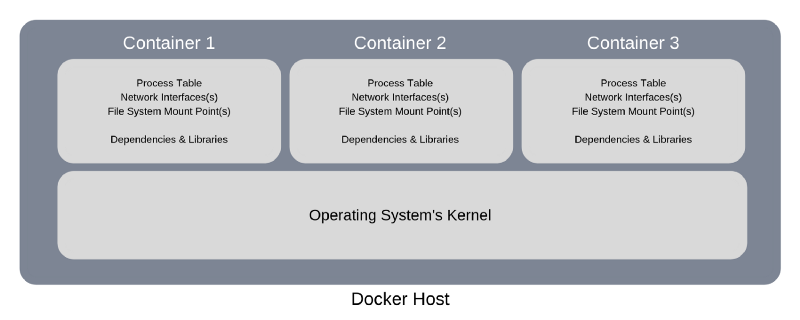
Let’s see what we could do if we didn’t use Docker to tackle this problem. In this case, we might solve the problem with the help of three physical machines or by using a single physical computer that is powerful enough to host and run three virtual machines.
Both approaches would help us install various versions of Python, and their associated dependencies, on each of these machines.
Regardless of which solution we chose, the costs of purchasing and maintaining the hardware are substantial.
Let’s look at how Docker might be a viable and cost-effective solution to this issue.
To comprehend this, we must first examine it’s functionality.
Introduction
It is not difficult to create a machine learning model that operates on our computers. It is more difficult when you are working with a customer who wants to use the model at scale, that is, a model that can scale and perform on all types of servers all over the world. After you have finished designing your model, it may function smoothly on your laptop or server, but not so well on other platforms, such as when you move it to the production stage or a different server. Many things can go wrong, such as performance issues, the application crashing, or the application not being effectively optimized.
A machine learning model had developed using a single programming language like Python but will almost certainly need to connect with multiple programming languages for data intake, data preparation, front-end, etc. Docker makes it easier to handle all of these interactions because each microservice can be built in a distinct language, allowing for scalability, and the quick addition, deletion of independent services. Reproducibility, portability, ease of deployment, granular updates, lightweight, and simplicity are all advantages of Docker.
Sometimes it is not the model that is the issue but the requirement to recreate the entire stack. Docker enables you to easily replicate the training and running environment for the machine learning model from any location. Docker allows you to package your code and dependencies into containers that can be transferred to different hosts, regardless of hardware or operating system.
Developers can use Docker to keep track of different versions of a container image, see who produced it with what, and roll back to prior versions. Finally, even if one of your machine learning application services is upgrading, fixing, or down, your machine learning application can continue to run. To update an output message integrated throughout the application, you do not have to update the whole application and disrupt other services.
Docker is a software platform that makes developing, executing, managing, and distributing applications easier. That had accomplished by virtualizing the operating system of the computer it had installed.
Advantages of Using Docker
- Rapid application deployment
- Portability across machines
- Version control and component reuse
- Sharing of images/dockerfiles
- Lightweight footprint and minimal overhead
- Simplified maintenance
What are Containers
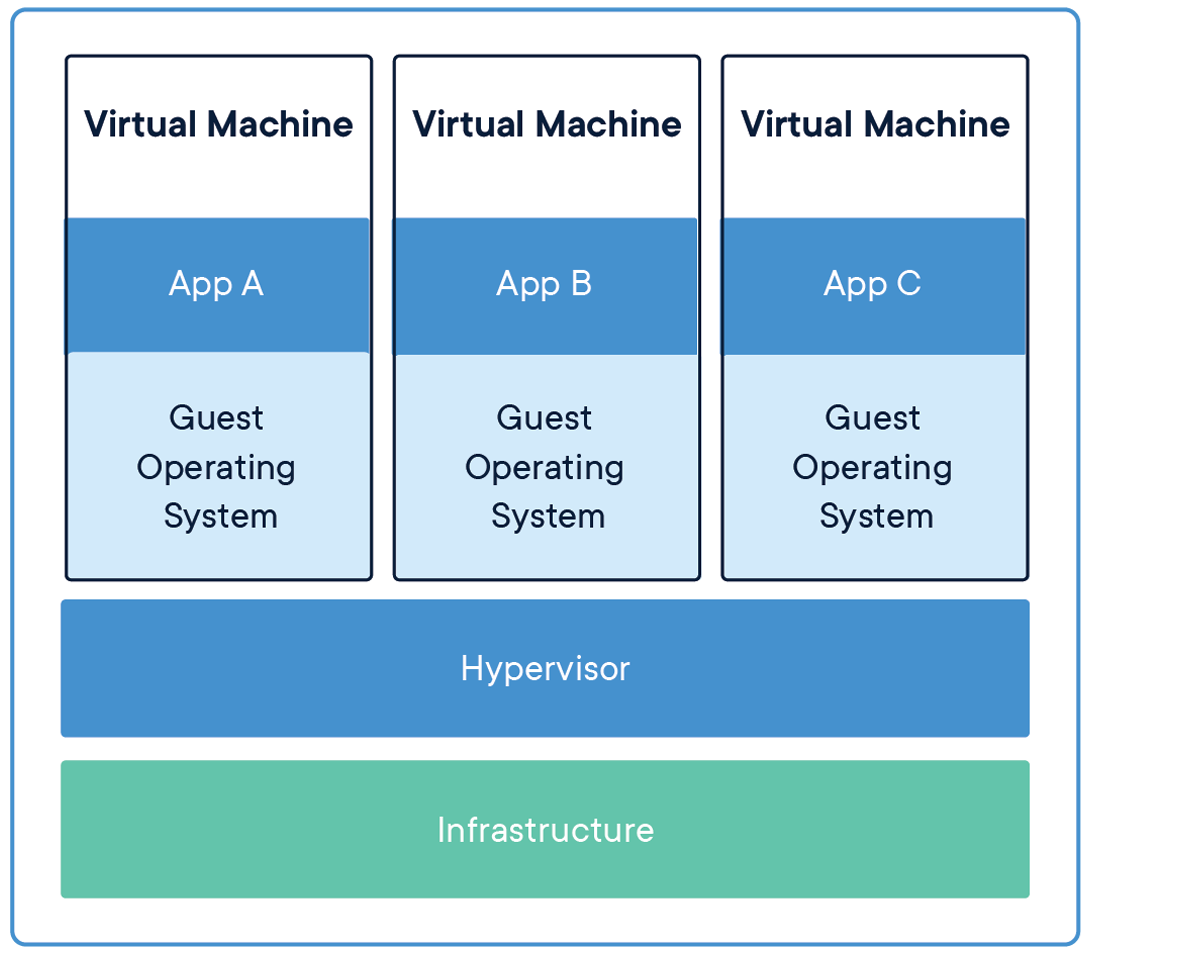
A container is an imaginary box or package that contains everything needed to run your project. Things like
- the projects source code
- the project dependencies
- the config file (e.g .env files e.t.c)
- the database setup
- the runtime environment
A Container allows you to share and run your project without worrying about the system configurations needed to run the project.
Docker Core Components
Docker Engine is one of the core components and is responsible for overall functioning.
It is a client-server based application with three main components.
- Server
- Rest API
- Client
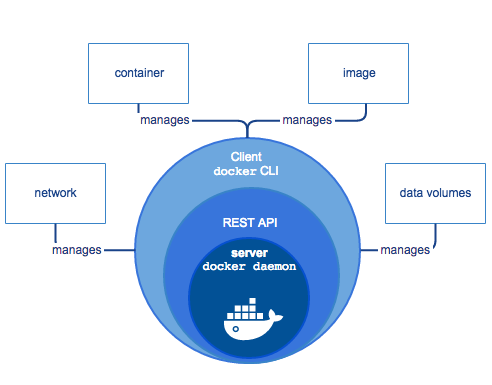
The Server executes the dockerd (Docker Daemon) daemon, which is nothing more than a process. On the Docker platform, it is in charge of creating and managing Docker Images, Containers, Networks, and Volumes.
The REST API defines how applications can interface with server and tell it how to complete their tasks.
The Client is a command-line interface that allows users to communicate with Docker by issuing commands.
To create a docker container, you need to run a docker image.
Docker Image

A docker image defines the structure of a container. It serves as a template or blueprint for creating a docker container. With a single docker image, you can create many containers for your project.
It’s like when you want to build a house. An architect draws out a floor plan for the house. With that floor plan, you can build many houses.
A docker image is the floor plan. Using a single docker image, you can create many containers.
The most popular way of creating a docker image is through a docker file.
Docker File
A docker file is a text file that holds the instructions on how Docker will build your docker image. To build a docker image, Docker executes the commands written in the docker file line by line.
This is an example of a Dockerfile. This dockerfile is for a java application.
FROM openjdk:11

ADD target/*.jar app.jar

ENTRYPOINT["java", "-jar", "app.jar"]
FROM openjdk:11
ADD target/*.jar app.jar
ENTRYPOINT["java", "-jar", "app.jar"]Let’s explain what the statement on each line does.
FROM openjdk:11FROM openjdk:11Every docker image is built on an existing image. This existing image is called the base image. It can be
an image of a runtime environment e.g java, node, or an image of an operating system e.g ubuntu. The first instruction of every docker file must specify the base image.
The syntax for specifying the base image is
FROM <baseImageName>:<tag>FROM <baseImageName>:<tag>Docker will pull this image from a docker registry when it is trying to build your image. A docker registry is like GitHub. It is a repository of docker images. The most used docker registry is docker hub.
In the example above, the docker image is for a java application, so the base image used is a java runtime environment. For a node js project, you can use the image of node runtime environment as your base image.
The tag specifies the version of your base image. The example above uses the tag for java 11. You can specify a base image without the column and the tag. When you don’t specify a tag, Docker will download the latest version of the base image.
ADD target/*.jar app.jarADD target/*.jar app.jarA container contains everything needed to run the application. So to create a container, you need to copy the things needed to run the application into the docker image. This is done using either the ADD or COPY command. The example above uses the ADD command.
The example above is for a java application. So everything needed to run the application is already bundled into a jar file. You just need to copy the jar file into the container.
For other cases where you need the source code to run the app, you can copy the source code into the container. Here is an example.
FROM node:17-apline

WORKDIR /app

COPY src/ .

RUN npm install

CMD ["node", "app.js"]
FROM node:17-apline
WORKDIR /app
COPY src/ .
RUN npm install
CMD ["node", "app.js"]Every docker file must include the command that will run when you run a container. This command is usually the command used to start your application. For java applications, the java -jar appname.jar command is usually used. The command is specified using either the ENTRYPOINT or CMD. Every docker must have an Entry point command or CMD command.
ENTRYPOINT [“java”,”-jar”,”/calculator.jar”]ENTRYPOINT [“java”,”-jar”,”/calculator.jar”]How to Containerize Your Application
- Step 1: Create your application
- Step 2: Download and install docker
- Step 3: Build your docker image
To build your docker image, you need a Dockerfile. In the root directory of your project, create a new file called ‘Dockerfile’. Define the structure of your docker image in the file, then run the docker build command.
build command syntax:
docker build -t <imageName>:<tag> <dockerFilePath>docker build -t <imageName>:<tag> <dockerFilePath>- The
-tflag is used to give the image a name and a tag. - Ideally, your docker file should be located in the root directory of your project. So to specify its path, use “ . ”.
How to Run Docker Container
To run a container, run the following command in the terminal of the root directory of your project.
docker run --name <containerName> <imageName>:<tag>docker run --name <containerName> <imageName>:<tag>The docker run command creates a new container from the docker image. If you don’t specify a name for your container, docker gives your container a random name.
After you execute the run command, you should see your calculator running in the terminal.
Every time you use the docker run command, docker creates a new container.
- To restart an existing container, run
docker start <containerName> - To stop your running container, run
docker stop <containerName> - To check the list of running containers, run
docker ps. - To get all containers, both running and not running, run
docker ps -a.
TIP
Whenever you make an update to your code, you will need to rebuild your docker image!
Conclusion
Docker is software for creating and managing containers. Containers make it easy to share and test your project.
To create a container for your project, use a docker file to build a docker image. This image should contain everything needed to run your project. Then use the image to create as many containers as you want.