 James' CS Book
Kubernetes: What It Is, How It Works, and Why It's a Game Changer

Introduction
Kubernetes, which was first released on June 7th, 2014, has quickly established itself as the de facto industry standard for orchestrating containers. According to Red Hat's State of Enterprise Open Source 2022 report, 70% of the 1,296 IT leaders polled said their organizations use Kubernetes.
This figure is expected to rise further, as nearly one-third of the polled IT leaders said they planned to significantly increase their use of containers over the next 12 months, and there have been over a million downloads of this particular tool so far.
What is Kubernetes?
Kubernetes is an open source container management system. It was originally developed by Google engineers to help them manage large-scale containerized applications, and it has since become the most popular solution for running containers in production.

Kubernetes is a platform for running containerized applications. It's designed to make it easier to deploy, scale, and manage those applications—which are usually made up of multiple containers that work together to provide features like web serving or data processing.
Kubernetes can be thought of as a distributed system for managing containerized applications at large scale. Kubernetes clusters are made up of one or more master nodes that control worker nodes, which run tasks on behalf of clients through API requests sent over HTTP or gRPC protocols.
How does Kubernetes work?
Kubernetes is used for automating the deployment, scaling, and management of containerized applications. It supports multiple platforms and infrastructure providers.
Kubernetes provides two primary things:
- A way to manage your container clusters.
- A way to get data from one place to another (such as from a database to an application)
Kubernetes also provides a lot of features that make it easier to manage your cluster of containers. It includes a built-in UI interface, allowing you to manage everything from a single location. It also has automatic recovery and self-healing capabilities, so if something goes wrong with one of your nodes (like an outage), Kubernetes will automatically restart it when the issue is resolved.

Not only that, it is also highly configurable. You can use it to deploy any type of application, from web servers to databases. It has support for many different cloud environments, including Google Cloud Platform, Amazon Web Services (AWS), and Microsoft Azure.
What and why containers?
Containers are a way of packaging and running applications in a portable and isolated environment. They allow applications to be run in a consistent and predictable manner, regardless of the underlying infrastructure. This makes it easier to develop, test, and deploy applications, as well as to run multiple applications on the same host without them interfering with each other.
Containers have become popular recently because they provide a number of benefits over traditional deployment methods. For example, they are:
Lightweight: A container is a single process that runs on a machine and includes only the libraries, configuration files, and other dependencies it needs to run. This means containers can be started quickly, as there is no need for the initial setup of a virtual machine (VM), which can take time depending on its size.
Portable: Containers can be moved from one environment to another with minimal effort because their entire runtime state is included in each container. Containers also provide an additional layer of abstraction between an application's code and the underlying OS kernel, making it easier to move applications between servers while maintaining compatibility with all dependencies installed inside them—you don't have to worry about incompatibilities between your app's software stack and whatever server you choose!
Isolated: To keep containers separate from each other on the same host machine, they run in separate namespaces—this means that even if two or more processes share an IP address outside their respective namespaces, they won't necessarily be able to access each other's files or ports! Using this approach reduces port conflicts since network services won't need specific ports opened up on hosts just so the operating system knows where to send data destined for certain applications.
INFO
The level of isolation provided by containers can vary depending on the container runtime and the specific configuration of the container. Some container runtimes, such as Docker, provide a high level of isolation by default, while others may provide more limited isolation. However, in general, containers are designed to provide a certain degree of isolation to ensure that they can run independently and reliably. This makes it easier to set up and manage complex infrastructures with many different applications, all running on the same host. You can also run multiple containers on the same hardware with minimal overhead since they're isolated from each other.
How do containers compare to virtual machines?
Containers are more lightweight than virtual machines (VMs) in that you don't need to run an entire operating system. Containers are also more portable, as they're typically created from a Dockerfile or other source code and can be moved around easily on your machine.

Containers are more efficient than virtual machines because they allow you to send just the right amount of data over the network. This is especially important for microservices, which need to share resources but often can't because different users have different needs (like different database sizes).
Containers are more scalable than virtual machines because it's easier to increase their size as needed; all one has to do is allocate more resources (RAM) and/or CPU cycles when deploying new containers onto existing hosts with Kubernetes' replication controller feature set built-in for this purpose!
Containers are "kind of" safer than virtual machines because there isn't much that can go wrong with them while they're running. For example, each container instance can start new processes while also handling requests from programs running outside of that container instance using its own IP address. This is very different from how things are handled inside a virtual machine, where processes running on the same host share resources with one another.
With containers, you can achieve true cloud portability
Containers can indeed provide a high degree of portability and allow applications to be easily moved between different environments. This is one of the key benefits of using containers, as it enables organizations to develop and deploy applications consistently and predictably, regardless of the underlying infrastructure.
Containers provide this portability by packaging the application and its dependencies into a self-contained unit that can quickly move and run on any host with the necessary container runtime. This means an application can be developed and tested on one system and then run in production on another without any changes or modifications. Additionally, containers are designed to be portable and run on various infrastructures, from on-premises data centers to public clouds. This allows organizations to choose the best environment for their applications and to move them between different environments if needed quickly.
Rise of containerisation is promoting adoption of Kubernetes
The rise of containers has indeed played a significant role in promoting the adoption of Kubernetes. Kubernetes is a container orchestration platform, which means that it is designed to manage and deploy large numbers of containers across a cluster of machines.
As containers have become more widely used, there has been a growing need for effective ways to manage and deploy them at scale. This has led to the rise of Kubernetes and other container orchestration platforms, which provide the necessary tools and features for managing and deploying large numbers of containers.
Additionally, Kubernetes has been designed to work seamlessly with containers and to provide a consistent and predictable way to run and manage containerized applications. This has made it an attractive choice for organizations using containers and looking for a powerful and flexible platform for managing and deploying their applications.
Kubernetes Architecture
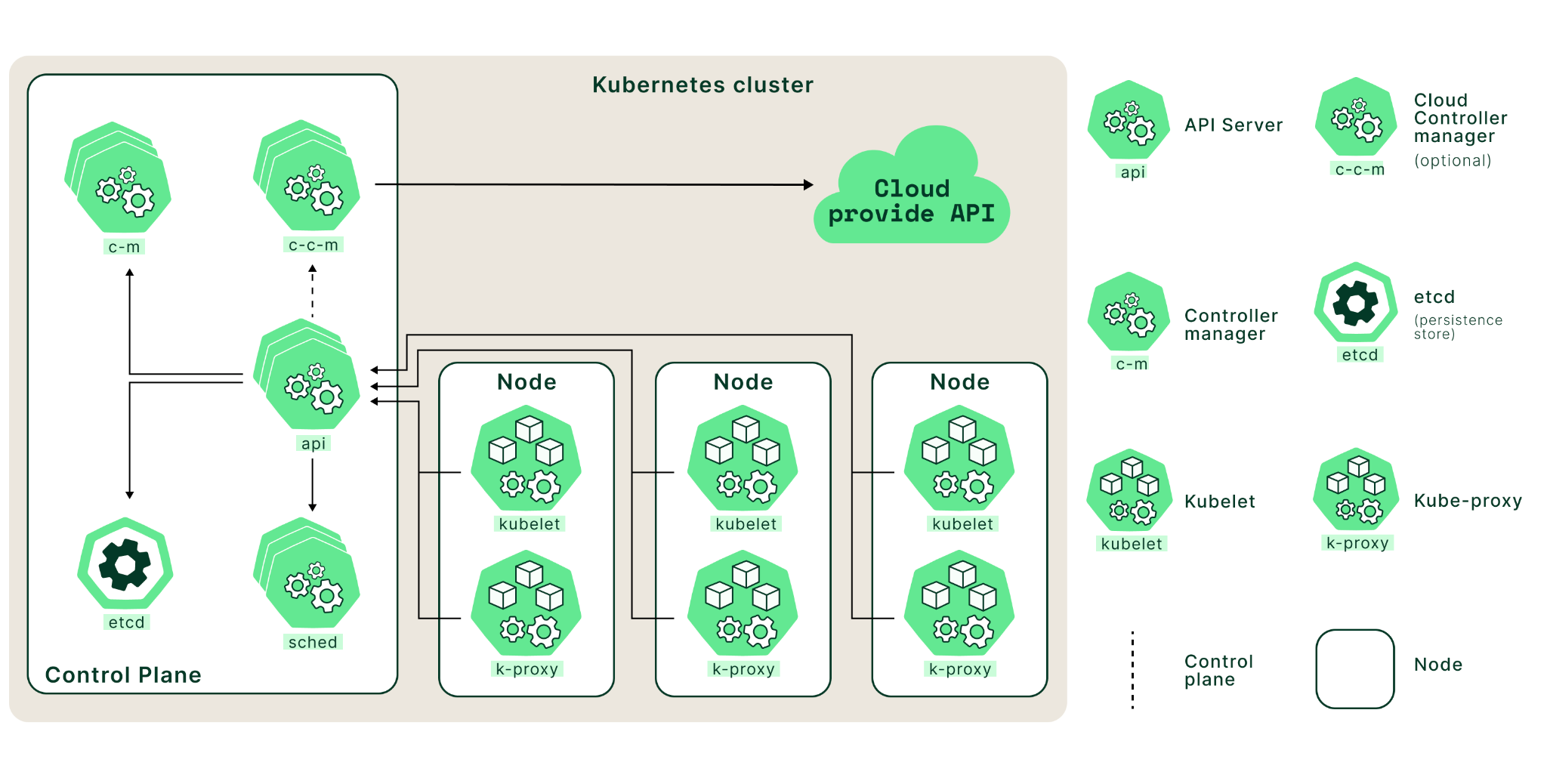
Control Plane Components
The control plane is a set of components that comprise the core of Kubernetes. These components are responsible for scheduling, creating, and managing containers across a cluster of nodes.
kube-apiserver
At its core, the Kubernetes API server acts as an intermediary between user requests and the underlying components of a given cluster. It works by receiving requests from users via an HTTP or HTTPS request, validating those requests using predefined rules, and then forwarding them to other components (such as nodes) to perform an action such as deploying or scaling an application.
The API server also interfaces with other components in the control plane. For example, it can receive requests from the scheduler to create new pods in a cluster or talk to the controller manager to adjust an application’s resource utilization
etcd
etcd is an open-source storage system that stores data as key/value pairs across multiple servers in a cluster. Kubernetes uses etcd as its primary storage mechanism for storing all its cluster state information, such as configurations, endpoint information, service definitions, secrets, etc.
etcd can be set up in a highly distributed manner across multiple nodes so that no single node can become a point of failure. If one node fails or becomes unavailable, other nodes still have access to the same consistent set of data, making it possible to maintain availability and high performance even under extreme load conditions or during unexpected outages.
etcd is an indispensable component of any Kubernetes deployment because it provides reliable storage for vital application data while enabling reliable communication among components within and between clusters.
kube-scheduler
Kubernetes has a built-in cluster scheduler that is responsible for assigning workloads to available nodes in the cluster. The kube-scheduler determines which node should run each application within the cluster. The node selection process includes deciding which nodes have enough resources to meet an application’s requirements and which are most appropriate based on user preferences.
The kube-scheduler uses an algorithm known as bin packing to determine where to place containers in the cluster. This algorithm considers all available resources (CPU, memory, etc.) and maximizes utilization while ensuring that no single node is overloaded.
In addition, the scheduler will consider other factors, such as node labels (for example, if certain nodes need to be used only for specific purposes) or affinity rules (which allow you to specify which nodes a particular container should run on). The scheduler also keeps track of any changes in resource usage over time, so it can scale the pods in or out (if pod scaling is configured using solutions such as Horizontal Pod Autoscaler).
If any changes occur in terms of resource availability or user preferences, the scheduler will react by changing existing workload assignments or creating new assignments as needed.
kube-controller-manager
Kubernetes uses a built-in controller framework that ensures that all the nodes in your cluster are running as expected. It includes several controllers, each of which is responsible for a specific aspect of the cluster’s behavior:
- Node controller: The node controller is responsible for ensuring that all nodes in the cluster are healthy and ready to accept workloads. It monitors the status of nodes on an ongoing basis and takes corrective action if any node fails or becomes unresponsive. For example, it can remove the unresponsive node from the cluster if necessary.
- Replication controller: The replication controller runs continuously in the background to ensure that all pods (containers) are running as expected. It can detect when new pods have been added or removed from the cluster and adjust accordingly by starting or stopping additional pods to maintain desired pod count levels.
- Service account and token controllers: These two controllers work together to manage authentication within a Kubernetes cluster by creating and managing service accounts and tokens for users to securely access resources within their environments.
- Endpoints controller: This controller manages communication among services on different cluster nodes. It creates endpoints on those services to allow other services to communicate with them directly without going through an external load balancer. This helps improve application performance by reducing latency across services in a distributed system like Kubernetes clusters.
The kube-controller-manager also provides other essential functions, such as managing the namespace lifecycle, handling service accounts, and managing configuration changes. Overall, the kube-controller-manager plays a critical role in ensuring the desired state of the Kubernetes cluster.:
Worker node components
A worker node is a physical or virtual machine in Kubernetes responsible for running containerized apps, represented as pods and managed by the control plane. Each worker node has a kubelet that connects with the control plane to retrieve the necessary state for the pods operating on that node and a container runtime responsible for running the containers within the pods.
The worker node also runs additional system components, such as the kube-proxy, which aid in managing networking in the cluster. In a Kubernetes cluster, the worker nodes provide the computing power required to run containerized applications.
kubelet
The kubelet is essential to any Kubernetes worker node, acting as a bridge between the master and worker nodes. It runs on each node in the Kubernetes cluster to manage containers, monitoring their health and ensuring that they have access to enough resources for optimal performance.
The kubelet connects with other cluster components, such as the API server, scheduler, and replication controller, to coordinate tasks. Periodically, the kubelet interacts with the API server to retrieve the desired state of the containers and pods running on its node.
The desired state includes information such as which containers and pods must be running on the node, which images must be deployed, and how they must be configured. After retrieving the intended state, the kubelet compares it to the present state of containers and pods on the node. If the current state does not match the desired state, the kubelet takes action to reconcile the two, such as starting or stopping containers or creating or deleting pods.
Kubelet also monitors container health by checking CPU/memory use and notifying the API server of any anomalies related to a specific container’s performance or health status.
kube-proxy
The worker nodes of Kubernetes are responsible for operating the cluster’s applications. The kube-proxy component is essential to these nodes since it functions as a proxy between cluster services and external clients. It controls which services can access each other and ensures that requests from external clients reach the correct service to manage network traffic.
Kube-proxy offers load-balancing features by dispersing incoming requests over different service endpoints. This ensures that all requests are efficiently handled and prevents any single endpoint from overloading.
Kubernetes kube-proxy also manages networking across pods, ensuring communication among containers within and between pods. This enables containers running in different pods to connect without using public IP addresses or directly exposing themselves to the Internet.
Game-changing Implications of Kubernetes
Kubernetes has several game-changing implications for how applications are developed, deployed, and managed. Some of the critical implications of Kubernetes include the following:
Increased agility and speed: Kubernetes provides a powerful and flexible platform for running and managing applications, which allows organizations to deploy and update applications quickly and easily. This can reduce the time and effort required to develop and deploy applications and enable organizations to respond more rapidly to changing business needs.
Improved scalability and reliability: Kubernetes includes features such as self-healing and autoscaling, which can help to ensure that applications are always available and running at the required capacity. This can improve the reliability and performance of applications and help organizations handle sudden increases in traffic or workloads.
Reduced operational overhead: Kubernetes provides a consistent and centralized way to manage and deploy applications across a cluster of machines. This can simplify the operational complexity of running and managing applications and help organizations reduce the time and effort required to maintain their applications.
Greater portability and flexibility: Kubernetes is designed to be portable and run on various infrastructures, from on-premises data centers to public clouds. This can give organizations greater flexibility and choice in where they run their applications and make it easier to move applications between different environments. Overall, Kubernetes has the potential to significantly change the way applications are developed, deployed, and managed and can provide organizations with many benefits in terms of agility, scalability, reliability, and simplicity.
Importance of Kubernetes
The use of Kubernetes and containers is growing in importance for software developers and other IT professionals because to their widespread adoption and the many advantages they offer for creating, deploying, and maintaining applications. Some of the reasons why Kubernetes and containers skills are becoming increasingly important include:
Kubernetes help you manage your containerized applications. It helps you run and scale your applications, and it helps you do it at a low cost.
It is based on the idea that applications should be constructed as small, individual pieces (containers) rather than large, monolithic programs. In a containerized environment, you don't worry about individual machines; instead, you worry about how to run applications and services across potentially thousands of machines.
Kubernetes also offers built-in tools for managing applications and services across potentially thousands of machines. For example: You can create groups of containers (known as "pods") on which an application depends by defining labels in its manifest file; then Kubernetes will ensure they're always running together when needed by putting them into the same pod if possible.
Your pods can also be distributed across multiple hosts to provide automatic high availability or load balancing. If one host fails or becomes unavailable for some reason due to hardware problems or network connectivity issues, Kubernetes will automatically move any pods running there over to another machine so they can continue running without interruption.
Kubernetes can help with Orchestration and Deployment
Kubernetes can help with orchestration and deployment in several ways. Some of the key ways in which Kubernetes can assist with these tasks include:
Automated deployment and updates: Kubernetes provides a declarative approach to application deployment, which means that users define their applications' desired state, and Kubernetes ensures that the application is running as expected. This can make deploying and updating applications easier, as users don't need to worry about the specific steps required to bring the application up or down.
Rolling updates and rollbacks: Kubernetes allows users to perform rolling updates and rollbacks, which means that they can update their applications incrementally and in a controlled manner. This can help reduce the risk of downtime or other issues during deployments and make it easier to recover from problems if they occur.
Self-healing and autoscaling: Kubernetes includes features such as self-healing and autoscaling, which can help to ensure that applications are always running and available. If a container or application fails, Kubernetes will automatically replace it, and if the workload increases, Kubernetes will automatically scale the application to meet the demand. This can improve the reliability and performance of applications and can help to reduce the operational overhead of managing them.
Scheduling and resource management: Kubernetes provides a robust scheduling and resource management system, allowing users to specify their applications' requirements and constraints and let Kubernetes handle the details of running and managing the applications. This can make it easier to deploy and manage applications at scale and help optimize the use of resources in the cluster.
Overall, Kubernetes is designed to provide many benefits for orchestration and deployment and help organizations develop, deploy, and manage applications more efficiently and reliably.