 James' CS Book
Git Commit Message Convention That You Can Follow!

Why should you write better commit messages?
I challenge you to open up a personal project or any repository for that matter and run git log to view a list of old commit messages. The vast majority of us who have run through tutorials or made quick fixes will say "Yep... I have absolutely no idea what I meant by 'Fix style' 6 months ago."
Perhaps you have encountered code in a professional environment where you had no idea what it was doing or meant for. You've been left in the dark without code comments or a traceable history, and even wondering "what are the odds this will break everything if I remove this line?"
Steps to Write Better Commit Messages
Let's summarize the suggested guidelines:
Capitalization and Punctuation: Capitalize the first word and do not end in punctuation. If using Conventional Commits, remember to use all lowercase.
Mood: Use imperative mood in the subject line. Example – Add fix for dark mode toggle state. Imperative mood gives the tone you are giving an order or request.
Type of Commit: Specify the type of commit. It is recommended and can be even more beneficial to have a consistent set of words to describe your changes. Example: Bugfix, Update, Refactor, Bump, and so on. See the section on Conventional Commits below for additional information.
Length: The first line should ideally be no longer than 50 characters, and the body should be restricted to 72 characters.
Content: Be direct, try to eliminate filler words and phrases in these sentences (examples: though, maybe, I think, kind of). Think like a journalist.
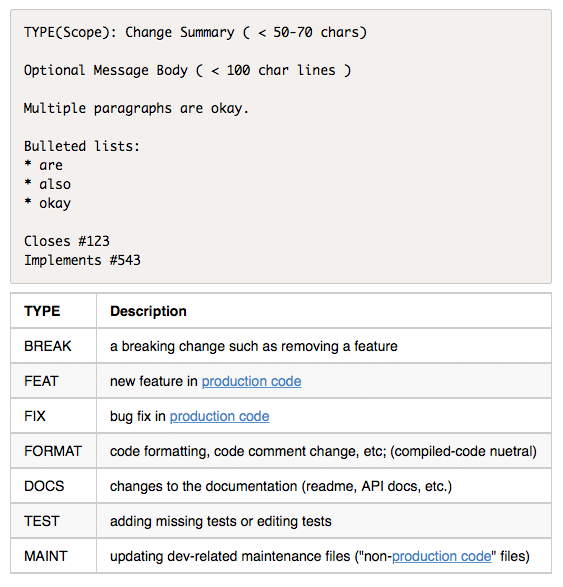
A typical git commit message will look like
<type>(<scope>): <subject><type>(<scope>): <subject>"Type" must be one of the following mentioned below!
build: Build related changes (eg: npm related/ adding external dependencies)chore: A code change that external user won't see (eg: change to.gitignorefile or.prettierrcfile)feat: A new featurefix: A bug fixdocs: Documentation related changesrefactor: A code that neither fix bug nor adds a feature. (eg: You can use this when there is semantic changes like renaming a variable/ function name)perf: A code that improves performancestyle: A code that is related to stylingtest: Adding new test or making changes to existing test
Scope
When a project is large, it is often composed of distinct subsystems or areas. The nature of this division and the names themselves are project-specific; and decided on by the author(s). The key is consistency - be sure to have a definitive list of the various scopes somewhere in the project notes so that all contributors are aware of them. Adding a new scope should be a considered decision, not just a whim when making your commit.
Often a project is divided into subdirectories or packages or modules or some other organizational unit that may naturally provide useful scopes.
Case (upper/lower) is up to the authors - again, just be consistent. When scope correlates with an existing org unit, it may be useful to use the same case as the element it corresponds to. For example, Java packages are generally all lowercase, so it is best to mimic that in the scope.
Many simpler projects will not have scopes and so this portion of the commit message will not be present. [If later the project expands and scopes start making sense, they can be introduced at that time.]
Additionally, not every commit to projects that do have scopes will necessarily specify a scope. If the commit is not limited or relevant to a single scope, leave it out.
Subject
- Use imperative, present tense (eg: use "add" instead of "added" or "adds")
- Don't use dot(.) at end
- Don't capitalize first letter
Example Commit Messages
Commit message with description and breaking change footer
feat: allow provided config object to extend other configs

BREAKING CHANGE: `extends` key in config file is now used for extending other config files
feat: allow provided config object to extend other configs
BREAKING CHANGE: `extends` key in config file is now used for extending other config filesCommit message with ! to draw attention to breaking change
feat!: send an email to the customer when a product is shippedfeat!: send an email to the customer when a product is shippedCommit message with scope and ! to draw attention to breaking change
feat(api)!: send an email to the customer when a product is shippedfeat(api)!: send an email to the customer when a product is shippedCommit message with both ! and BREAKING CHANGE footer
chore!: drop support for Node 6

BREAKING CHANGE: use JavaScript features not available in Node 6.
chore!: drop support for Node 6
BREAKING CHANGE: use JavaScript features not available in Node 6.Commit message with no body
docs: correct spelling of CHANGELOGdocs: correct spelling of CHANGELOGCommit message with scope
feat(lang): add Polish languagefeat(lang): add Polish languageCommit message with multi-paragraph body and multiple footers
fix: prevent racing of requests

Introduce a request id and a reference to latest request. Dismiss
incoming responses other than from latest request.

Remove timeouts which were used to mitigate the racing issue but are
obsolete now.

Reviewed-by: Z
Refs: #123
fix: prevent racing of requests
Introduce a request id and a reference to latest request. Dismiss
incoming responses other than from latest request.
Remove timeouts which were used to mitigate the racing issue but are
obsolete now.
Reviewed-by: Z
Refs: #123Summary