 James' CS Book
API Design Best Practices

Characteristics of good API
Domain-specific: Call names, parameters and filters must be descriptive, with no unnecessary over-generalization and abstraction. See the SOAP as an anti-pattern.
Clear error messages. Validate client input off the bat. Report both missing and unknown parameters as equal errors. (Include warnings in responses for Web API).
As stateless as possible, but still provide lots of useful functionality per single call. Just mapping your internal data model to API gets you nowhere; you must do lots of hard work under the hood to create the illusion of things just happening.
Do not mix transport layer logic and API logic; this makes error resolution complicated: Did I get HTTP 404 because of the wrong URL or because I used the wrong parameter?
Each API call should serve a Use case that should be fulfilled with that single request. Do not split the API into smaller pieces than you absolutely have, even if it would be more difficult for you.
Imagine ordering a “ready-to-assemble” table online, only to find that the delivery package did not include the assembly instructions. You know what the end product looks like, but have little to no clue how to start assembling the individual pieces to get there. A poorly designed API tends to create a similar experience for a consumer developer. Well designed APIs make it easy for consumer developers to find, explore, access, and use them. In some cases, good quality APIs even spark new ideas and open up new use cases for consumer developers.
There are methods to improve API design — like following RESTful practices. But time and again we are seeing customers unknowingly program minor inconveniences into their APIs. To help you avoid these pitfalls, here are six of the most common mistakes we have seen developers make while creating the API — and guidance on how to get it right.
Thinking inside-out vs outside-in
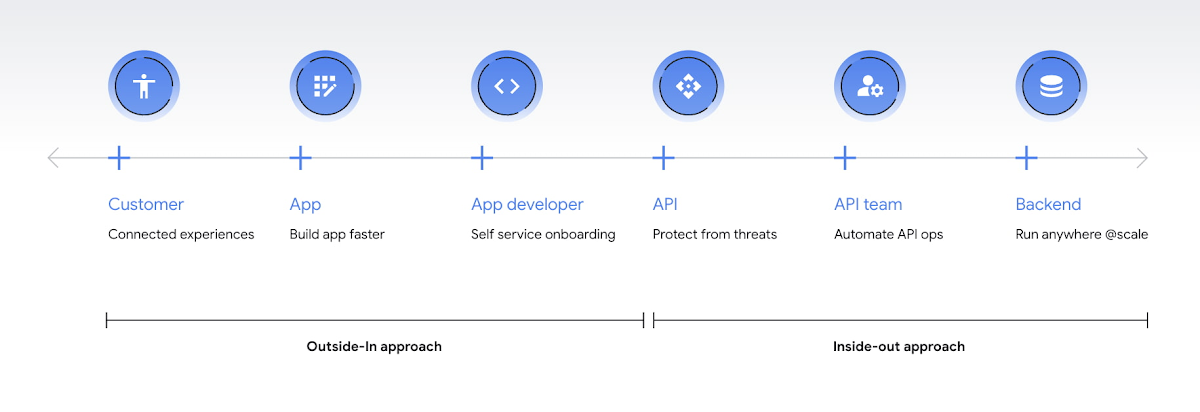
Being everything for everybody often means that nothing you do is the best it could be, and that is just as true for APIs. When customers turn to APIs, they are looking for specific solutions to make their work easier and more productive. If there is an API that better works to their needs, they will choose that one over yours. This is why it’s so important to know what your customers need to do their work better, and then building to fill those needs. In other words, start thinking Outside-in as opposed to Inside-Out. Specifically,
Inside-out refers to designing APIs around internal systems or services you would like to expose. Outside-in refers to designing APIs around customer experiences you want to create. Read more about the Outside-in perspective in the API product mindset.
The first step to this is learning from your customers — be it internal consumer developers or external customers — and their use cases. Ask them about the apps they are building, their pain points, and what would help streamline or simplify their development. Write down their most significant use cases and create a sample API response that only gives them the exact data they need for each case. As you test this, look for overlap between payloads and adapt your designs to genericize them across common or similar use cases.
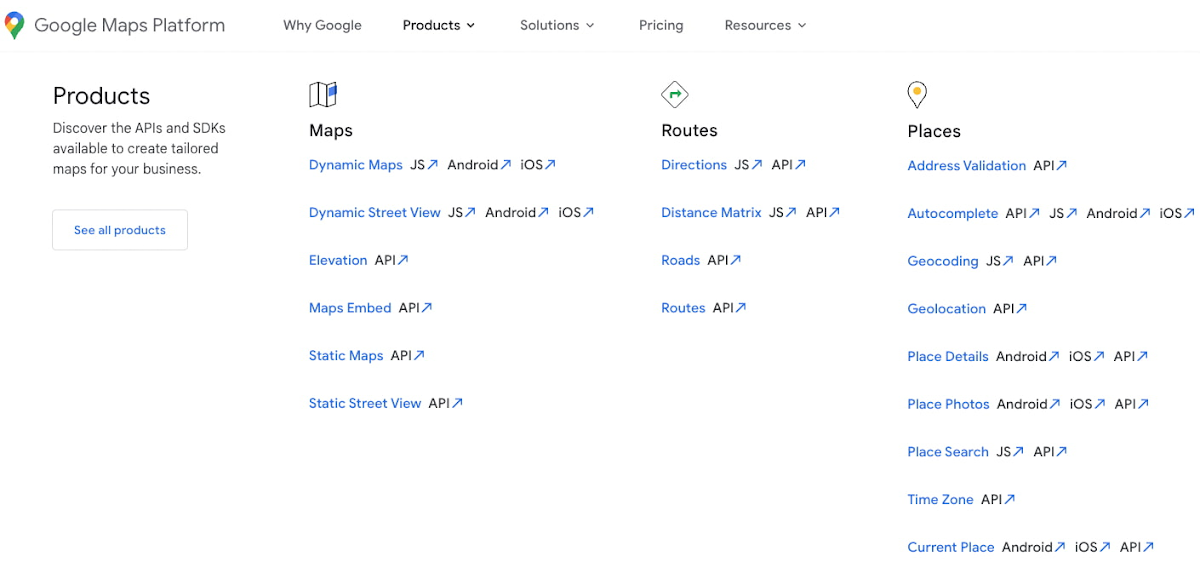
If you can’t connect with your customers — because you don’t have direct access, they don’t have time, or they just don’t know what they want — the best approach is to imagine what you would build with your APIs. Think big and think creatively. While you don't want to design your APIs for vaporware, thinking about the big picture can make it easier to build non-breaking changes in the future. For example the image below showcases APIs offered by Google Maps. Even without diving into the documentation, looking at the names like “Autocomplete” or “Address Validation” clearly outlines the purposes and potential fit for a customer’s use case.
Making your APIs too complex for users
Customers turn to APIs to bypass complicated programming challenges so they can get to the part they know how to do well. If they feel like using your API means learning a whole new system or language, then it isn’t fitting their needs and they will likely look for something else. It’s up to your team to make an API that is strong and smart enough to do what your customer wants, but also simple enough to hide how complicated the tasks your API solves for really are. For example if you know your customers are using your APIs to present information about recently open restaurants and highly rated pizzeria to their consumers, providing them with a simple API call as below would be of great help:
GET /restaurants?location=Austin&category=Pizzeria&open=true&sort=-priority,created_atGET /restaurants?location=Austin&category=Pizzeria&open=true&sort=-priority,created_atTo see if your API design is simple enough, pretend you are building the whole system from scratch — or if you have a trusted customer who is willing to help, ask them to test it and report their results. If you can complete the workflow without having to stop to figure something out, then you're good to go. On the other hand, if you catch rough edges caused by trying to code around system complexity issues, then keep trying to refactor. The API will be ready when you can say that nothing is confusing and that it either meets your customers’ needs or can easily be updated as needs change.
Creating “chatty” APIs with too many calls
Multiple network calls slow down the process and creates higher connection overhead — which means higher operational costs. This is why it’s so important to minimize the number of API calls.
The key to this is outside-in design: simplify. Look for ways to reduce the number of API calls a customer must make in their application's workflow. If your customers are building mobile applications, for example, they often need to minimize their network traffic to reduce battery drain, and requiring a couple calls instead of a dozen can make a big difference.
Rather than deciding between building distinct, data-driven microservices and streamlining API usage, consider offering both: fine-grained APIs for specific data types, and “experience APIs” (APIs that are designed to power user experiences. Here is a further theoretical discussion on Experience APIs) around common or customer-specific user interfaces. These experience APIs compose multiple smaller domains into a single endpoint; making it much simpler for your customers — especially those building user interfaces — to render their screens easily and quickly.
Another option here is to use something like GraphQL to allow for this type of customizability. Generally you should avoid building a unique endpoint for every possible screen, but common screens like home pages and user account information can make a world of difference to your API consumers.
Not allowing for flexibility
Even if you’ve followed all of the steps above, you may find that there are edge cases that do not fit under your beautifully designed payloads. Maybe your customer needs more data in a single page of results than usual, or the payload has way more data than their app requires. You can’t create a one-size-fits-all solution, but you also don’t want a reputation for building APIs that are limiting. Here are 3 simple options to make your endpoints more flexible.
- Filter out response properties: You can either use query parameters for sorting and pagination, or use GraphQL which provides these types of details natively. By giving customers the option to request only the properties they need, it guarantees that they won’t have to sort through tons of unnecessary data to get what they need. For example, if some of your customers only need the title, author, and bestseller ranking, give them the ability to retrieve only that data with a query string parameter.
GET /books?fields=title,author,rankingGET /books?fields=title,author,ranking- Ability to sort with pagination. Generally, you don't want to guarantee the order of objects in an API response because minor changes in logic or peculiarities in your data source might change the sort order at some point. In some cases, however, your customers may want to sort by a particular field. Giving them that option, combined with a pagination option, will give them a highly efficient API when they only want the top few results. For example Spotify API utilizes a simple offset and limit parameter set to allow pagination. A sample endpoint as shown in the documentation would look like this
$ curl https://api.spotify.com/v1/artists/1vCWHaC5f2uS3yhpwWbIA6/albums?album_type=SINGLE&offset=20&limit=10$ curl https://api.spotify.com/v1/artists/1vCWHaC5f2uS3yhpwWbIA6/albums?album_type=SINGLE&offset=20&limit=10- Use mature compositions like GraphQL: Since customer data needs can differ, giving them on-the-fly composites lets them build to the combinations of data they need, rather than being restricted to a single data type or a pre-set combination of data fields. Using GraphQL can even bypass the need to build experience APIs, but when this isn’t an option, you can use query string parameter options like “expand” to create these more complex queries. Here is a sample response that demonstrates a collection of company resources with embedded properties included
"data": [
   {
     "CompanyUid": "27e9cf71-fca4",
     "name": "ABCCo",
     "status": "Active",
     "_embedded": {
       "organization": {
         "CompanyUid": "27e9cf71-fca4",
         "name": "ABCCo",
         "type": "Company",
         "taxId": "0123",
         "city": "Portland",
         "notes": ""
       }
     }
   }
]"data": [
{
"CompanyUid": "27e9cf71-fca4",
"name": "ABCCo",
"status": "Active",
"_embedded": {
"organization": {
"CompanyUid": "27e9cf71-fca4",
"name": "ABCCo",
"type": "Company",
"taxId": "0123",
"city": "Portland",
"notes": ""
}
}
}
]Making design unreadable to humans
“K”eep “I”t “S”imply “S”tupid when you are designing your API. While APIs are meant for computer-to-computer interaction, the first client of an API is always a human, and the API contract is the first piece of documentation. Developers are more apt to study your payload design before they dig into your docs. Observation studies suggest that developers spend more than 51% of their time in editor and client as compared to ~18% on reference.
For example, if you skim through the payload below it takes some time to understand because instead of property names it includes an “id”. Even the property name “data” does not suggest anything meaningful aside from just being an artifact of the JSON design. A few extra bytes in the payload can save a lot of early confusion and accelerate adoption of your API. Notice how user-ids appearing on the left of the colon (in the position where other examples of JSON ideally have property names) creates confusion in reading the payload.
"{id-a}":
{ "data":
  [
    {
      "AirportCode": "LAX",
      "AirportName": "Los Angeles",
      "From": "LAX",
      "To": "Austin",
      "departure": "2014-07-15T15:11:25+0000",
      "arrival": "2014-07-15T16:31:25+0000"
    }
... // More data
  ]
},"{id-a}":
{ "data":
[
{
"AirportCode": "LAX",
"AirportName": "Los Angeles",
"From": "LAX",
"To": "Austin",
"departure": "2014-07-15T15:11:25+0000",
"arrival": "2014-07-15T16:31:25+0000"
}
... // More data
]
},We think that JSON like this is more difficult to learn. If you want to eliminate any ambiguity in the words you choose to describe the data, keep the payload simple and if any of those labels could be interpreted in more than one way, adjust them to be more clear. Here is a sample response from Airlines endpoint of aviationstack API. Notice how the property names clearly explain the expected result while maintaining a simple JSON structure.
"data": [
      {
         "airline_name": "American Airlines",
         "iata_code": "AA",
         "iata_prefix_accounting": "1",
         "icao_code": "AAL",
         "callsign": "AMERICAN",
         "type": "scheduled",
         "status": "active",
         "fleet_size": "963",
         "fleet_average_age": "10.9",
         "date_founded": "1934",
         "hub_code": "DFW",
         "country_name": "United States",
         "country_iso2": "US"
      },
      [...]
]"data": [
{
"airline_name": "American Airlines",
"iata_code": "AA",
"iata_prefix_accounting": "1",
"icao_code": "AAL",
"callsign": "AMERICAN",
"type": "scheduled",
"status": "active",
"fleet_size": "963",
"fleet_average_age": "10.9",
"date_founded": "1934",
"hub_code": "DFW",
"country_name": "United States",
"country_iso2": "US"
},
[...]
]Know when you can break the RESTful rules
Being true to the RESTful basics — such as using the correct HTTP verbs, status codes, and stateless resource-based interfaces — can make your customers' lives easier because they don't need to learn an all new lexicon, but remember that the goal is just to help them get their job done. If you put RESTful design first over user experience, then it doesn’t really serve its purpose.
Your goal should be helping your customers be successful with your data, as quickly and easily as possible. Occasionally, that may mean breaking some "rules" of REST to offer simpler and more elegant interfaces. Just be consistent in your design choices across all of your APIs, and be very clear in your documentation about anything that might be peculiar or nonstandard.
Good error message, bad error message
Error messages are like letters from the tax authorities. You’d rather not get them, but when you do, you’d prefer them to be clear about what they want you to do next.
When integrating a new API it is inevitable that you’ll encounter an error at some point in your journey. Even if you’re following the docs to the letter and copy & paste code samples, there’s always something that will break – especially if you’ve moved beyond the examples and are now adapting them to fit your use case.
Good error messages are an underrated and underappreciated part of APIs. I would argue that they are just as important a learning path as documentation or examples in teaching developers how to use your API.
As an example, there are many people out there who prefer kinesthetic learning, or learning by doing. They forgo the official docs and prefer to just hack away at their integration armed with an IDE and an API reference.
Let’s start by showing an example of a real error message I’ve seen in the wild:
{
  status: 200,
  body: {
    message: "Error"
  }
}
{
status: 200,
body: {
message: "Error"
}
}If it seems underwhelming, that’s because it is. There are many things that make this error message absolutely unhelpful; let’s go through them one by one.
Send the right code
The above is an error, or is it? The body message says it is, however the status code is 200, which would indicate that everything’s fine. This is not only confusing, but outright dangerous. Most error monitoring systems first filter based on status code and then try to parse the body. This error would likely be put in the “everything’s fine” bucket and get completely missed. Only if you add some natural language processing could you automatically detect that this is in fact an error, which is a ridiculously overengineered solution to a simple problem.
Status codes are for machines, error messages are for humans. While it’s always a good idea to have a solid understanding of status codes, you don’t need to know all of them, especially since some are a bit esoteric. In practise this table is all a user of your API should need to know:
2xx Status Codes [Success]
| Code | Message | Description |
|---|---|---|
| 200 | OK | Indicates that the request has succeeded. |
| 201 | Created | Indicates that the request has succeeded and a new resource has been created as a result. |
| 202 | Accepted | Indicates that the request has been received but not completed yet. It is typically used in log running requests and batch processing. |
| 203 | Non-Authoritative Information | Indicates that the returned metainformation in the entity-header is not the definitive set as available from the origin server, but is gathered from a local or a third-party copy. The set presented MAY be a subset or superset of the original version. |
| 204 | No Content | The server has fulfilled the request but does not need to return a response body. The server may return the updated meta information. |
| 205 | Reset Content | Indicates the client to reset the document which sent this request. |
| 206 | Partial Content | It is used when the Range header is sent from the client to request only part of a resource. |
| 207 | Multi-Status (WebDAV) | An indicator to a client that multiple operations happened, and that the status for each operation can be found in the body of the response. |
3xx Status Codes [Redirection]
| Code | Message | Description |
|---|---|---|
| 300 | Multiple Choices | The request has more than one possible response. The user-agent or user should choose one of them. |
| 301 | Moved Permanently | The URL of the requested resource has been changed permanently. The new URL is given by the Location header field in the response. This response is cacheable unless indicated otherwise. |
| 302 | Found | The URL of the requested resource has been changed temporarily. The new URL is given by the Location field in the response. This response is only cacheable if indicated by a Cache-Control or Expires header field. |
| 303 | See Other | The response can be found under a different URI and SHOULD be retrieved using a GET method on that resource. |
| 304 | Not Modified | Indicates the client that the response has not been modified, so the client can continue to use the same cached version of the response. |
4xx Status Codes [Client Error]
| Code | Message | Description |
|---|---|---|
| 400 | Bad Request | The request could not be understood by the server due to incorrect syntax. The client SHOULD NOT repeat the request without modifications. |
| 401 | Unauthorized | Indicates that the request requires user authentication information. The client MAY repeat the request with a suitable Authorization header field |
| 402 | Payment Required (Experimental) | Reserved for future use. It is aimed for using in the digital payment systems. |
| 403 | Forbidden | Unauthorized request. The client does not have access rights to the content. Unlike 401, the client’s identity is known to the server. |
| 404 | Not Found | The server can not find the requested resource. |
| 405 | Method Not Allowed | The request HTTP method is known by the server but has been disabled and cannot be used for that resource. |
| 406 | Not Acceptable | The server doesn’t find any content that conforms to the criteria given by the user agent in the Accept header sent in the request. |
| 407 | Proxy Authentication Required | Indicates that the client must first authenticate itself with the proxy. |
| 408 | Request Timeout | Indicates that the server did not receive a complete request from the client within the server’s allotted timeout period. |
5xx Status Codes [Server Error]
| Code | Message | Description |
|---|---|---|
| 500 | Internal Server Error | The server encountered an unexpected condition that prevented it from fulfilling the request. |
| 501 | Not Implemented | The HTTP method is not supported by the server and cannot be handled. |
| 502 | Bad Gateway | The server got an invalid response while working as a gateway to get the response needed to handle the request. |
| 503 | Service Unavailable | The server is not ready to handle the request. |
| 504 | Gateway Timeout | The server is acting as a gateway and cannot get a response in time for a request. |
You of course can and should get more specific with the error codes (like a 429 should be sent when you are rate limiting someone for sending too many requests in a short period of time).
The point is that HTTP response status codes are part of the spec for a reason, and you should always make sure you’re sending back the correct code.
This might seem obvious, but it’s easy to accidentally forget status codes, like in this Node example using Express.js:
// ❌ Don't forget the error status code
app.post('/your-api-route', async (req, res) => {
  try {
    // ... your server logic
  } catch (error) {
    return res.send({ error: { message: error.message } });
  }

  return res.send('ok');
});

// ✅ Do set the status correctly
app.post('/your-api-route', async (req, res) => {
  try {
    // ... your server logic
  } catch (error) {
    return res.status(400).send({ error: { message: error.message } });
  }

  return res.send('ok');
});
// ❌ Don't forget the error status code
app.post('/your-api-route', async (req, res) => {
try {
// ... your server logic
} catch (error) {
return res.send({ error: { message: error.message } });
}
return res.send('ok');
});
// ✅ Do set the status correctly
app.post('/your-api-route', async (req, res) => {
try {
// ... your server logic
} catch (error) {
return res.status(400).send({ error: { message: error.message } });
}
return res.send('ok');
});In the top snippet we send a 200 status code, regardless of whether an error occurred or not. In the bottom we fix this by simply making sure that we send the appropriate status along with the error message. Note that in production code we’d want to differentiate between a 400 and 500 error, not just a blanket 400 for all errors.
Be descriptive
Next up is the error message itself. I think most people can agree that “Error” is just about as useful as not having a message at all. The status code of the response should already tell you if an error happened or not, the message needs to elaborate so you can actually fix the problem.
It might be tempting to have deliberately obtuse messages as a way of obscuring any details of your inner systems from the end user; however, remember who your audience is. APIs are for developers and they will want to know exactly what went wrong. It’s up to these developers to display an error message, if any, to the end user. Getting an “An error occurred” message can be acceptable if you’re the end user yourself since you’re not the one expected to debug the problem (although it’s still frustrating). As a developer there’s nothing more frustrating than something breaking and the API not having the common decency to tell you what broke.
Let’s take that earlier example of a bad error message and make it better:
{
  status: 404,
  body: {
    error: {
      message: "Customer not found"
    }
  }
}
{
status: 404,
body: {
error: {
message: "Customer not found"
}
}
}Already we can see:
We have a relevant status code: 404, resource not found
The message is clear: this was a request that tried to retrieve a customer, and it failed because the customer could not be found
The error message is wrapped in an error object, making working with the error a little easier. If not relying on status codes, you could simply check for the existence of body.error to see if an error occurred. That’s better, but there’s room for improvement here. The error is functional but not helpful.
Be helpful
This is where I think great APIs distinguish themselves from simply “okay” APIs. Letting you know what the error was is the bare minimum, but what a developer really wants to know is how to fix it. A “helpful” API wants to work with the developer by removing any barriers or obstacles to solving the problem.
The message “Customer not found” gives us some clues as to what went wrong, but as API designers we know that we could be giving so much more information here. For starters, let’s be explicit about which customer was not found:
{
  status: 404,
  body: {
    error: {
      message: "Customer cus_Jop8JpEFz1lsCL not found"
    }
  }
}
{
status: 404,
body: {
error: {
message: "Customer cus_Jop8JpEFz1lsCL not found"
}
}
}Now not only do we know that there’s an error, but we get the incorrect ID thrown back at us. This is particularly useful when looking through a series of error logs as it tells us whether the problem was with one specific ID or with multiples. This provides clues on whether it’s a problem with a singular customer or with the code that makes the request. Furthermore, the ID has a prefix, so we can immediately tell if it was a case of using the wrong ID type.
We can go further with being helpful. On the API side we have access to information that could be beneficial in solving the error. We could wait for the developer to try and figure it out themselves, or we could just provide them with additional information that we know will be useful.
For instance, in our “Customer not found” example, it’s possible that the reason the customer was not found is because the customer ID provided exists in live mode, but we’re using test mode keys. Using the wrong API keys is an easy mistake to make and is trivial to solve once you know that’s the problem. If on the API side we did a quick lookup to see if the customer object the ID refers to exists in live mode, we could immediately provide that information:
{
  status: 404,
  body: {
    error: {
      message: "Customer cus_Jop8JpEFz1lsCL not found; a similar object exists in live mode, but a test mode key was used to make this request."
    }
  }
}
{
status: 404,
body: {
error: {
message: "Customer cus_Jop8JpEFz1lsCL not found; a similar object exists in live mode, but a test mode key was used to make this request."
}
}
}This is much more helpful than what we had before. It immediately identifies the problem and gives you a clue on how to solve it. Other examples of this technique are:
- In the case of a type mismatch, state what was expected and what was received (“Expected a string, got an integer”)
- Is the request missing permissions? Tell them how to get them (“Activate this payment method on your dashboard with this URL”)
- Is the request missing a field? State exactly which one is missing, perhaps linking to the relevant page in your docs or API reference
NOTE
Be careful with what information you provide in situations like that last bullet point, as it’s possible to leak information that could be a security risk. In the case of an authentication API where you provide a username and password in your request, returning an “incorrect password” error lets a would-be attacker know that while the password isn’t correct, the username is.
Provide more pieces of the puzzle
We can and should strive to be as helpful as possible, but sometimes it isn’t enough. You’ve likely encountered the situation where you thought you were passing in the right fields in your API request, but the API disagrees with you. The easiest way to get to a solution is to look back at the original request and what exactly you passed in. If a developer doesn’t have some sort of logging setup then this is tricky to do, however an API service should always have logs of requests and responses, so why not share that with the developer?
At Stripe we provide a request ID with every response, which can easily be identified as it always starts with req_. Taking this ID and looking it up on the Dashboard gets you a page that details both the request and the response, with extra details to help you debug.

Note how the Dashboard also provides the timestamp, API version and even the source (in this case version 8.165 of stripe-node).
As an extra bonus, providing a request ID makes it extremely easy for Stripe engineers in our Discord server to look up your request and help you debug by looking up the request on Stripe’s end.
Be empathetic
The most frustrating error is the 500 error. It means that something went wrong on the API side and therefore wasn’t the developer’s fault. These types of errors could be a momentary glitch or a potential outage on the API provider’s end, which you have no real way of knowing at the time. If the end user relies on your API for a business critical path, then getting these types of errors are very worrying, particularly if you start to get them in rapid succession.
Unlike with other errors, full transparency isn’t as desired here. You don’t want to just dump whatever internal error caused the 500 into the response, as that would reveal sensitive information about the inner workings of your systems. You should be fully transparent about what the user did to cause an error, but you need to be careful what you share when you cause an error.
Like with the first example way up top, a lacklustre 500: error message is just as useful as not having a message at all. Instead you can put developers at ease by being empathetic and making sure they know that the error has been acknowledged and that someone is looking at it. Some examples:
- “An error occurred, the team has been informed. If this keeps happening please contact us at
{URL}” - “Something went wrong, please check our status page at
{URL}if this keeps happening” - “Something goofed, our engineers have been informed. Please try again in a few moments”
It doesn’t solve the underlying problem, but it does help to soften the blow by letting your user know that you’re on it and that they have options to follow up if the error persists.
Putting it all together In conclusion, a valuable error message should:
- Use the correct status codes
- Be descriptive
- Be helpful
- Provide elaborative information
- Be empathetic
Here’s an example of a Stripe API error response after trying to retrieve a customer with the wrong API keys:
{
  status: 404,
  body: {
    error: {
      code: "resource_missing",
      doc_url: "https://stripe.com/docs/error-codes/resource-missing",
      message: "No such customer: 'cus_Jop8JpEFz1lsCL'; a similar object exists in live mode, but a test mode key was used to make this request.",
      param: "id",
      type: "invalid_request_error"
    }
  },
  headers: {
    'request-id': 'req_su1OkwzKIeEoCy',
    'stripe-version': '2020-08-27',
  }
}
{
status: 404,
body: {
error: {
code: "resource_missing",
doc_url: "https://stripe.com/docs/error-codes/resource-missing",
message: "No such customer: 'cus_Jop8JpEFz1lsCL'; a similar object exists in live mode, but a test mode key was used to make this request.",
param: "id",
type: "invalid_request_error"
}
},
headers: {
'request-id': 'req_su1OkwzKIeEoCy',
'stripe-version': '2020-08-27',
}
}The result is an error message so overflowing with useful information that even the most junior of developers will be able to fix the issue and discover how to use the available tools to debug their code themselves.
Make Your APIs Secure
When developing APIs, security should come first. This is a must. Since you can execute an API call from the Internet, requests can come from anywhere.
When it comes to API security, there is no reason not to use encryption. Use SSL/TLS, always. SSL security is a very straightforward and least expensive method to make the request and response encrypted. TLS is a cryptographic protocol designed to provide secure, encrypted communication over a computer network. It encrypts data between an API client and an API server, preventing data from being read if intercepted between point A and point B. TLS ensures encryption of data in transit.
Another potential security threat could be long-lived authentication or authorization tokens for APIs. A best practice is to make them short-lived. You can do this by having custom API key management using low-overhead implementation protocols like OAuth or JWT. Short-lived API tokens are much easier to use and significantly more secure.
Define Requests Clearly
It all starts with defining your requests in a way that makes your API easy to use, reduces ambiguity, and brings some consistency. Let’s look at some of the ways that can help you achieve that.
- Make use of resource names:
Your request path should have the name of the resource with which the API is going to interact. For example, if your app providesproducts, use/productsin the API request as a noun.
TIP
Avoid using verbs with resource names in the request (e.g., /api/create-products) since the request’s type should define the verb, as explained below.
Use HTTP methods:
Most developers are familiar with the typical HTTP methods such asGET,POST,PUT, andDELETE. These are the type of common API requests developers make on the resources. So, something likeGET /productsindicates that the request is to fetch products.Use plural forms
You can use plural forms for all resource names. For example,/productscan be used to fetch all products, whereas/products/20is used to fetch a single product with an ID of20. Plural forms make your requests more consistent and intuitive.
Use Nested Hierarchy
You can provide a structured hierarchy for nested or related resources, so it’s easier for a larger group to work on a specific item or sub-item. But keep the depth level to a minimum. For example, for products that have reviews and ratings associated with them, you can define the relationship as follows:
GET /products/:product_id/reviewsPOST /products/:product_id/reviewsPUT /products/:product_id/reviews/:review_id
Most of the cases satisfy the resource mapping with a path. Still, certain exceptions are relevant to functionality and do not have any resources associated with it directly, such as /search or /bulk-actions. We can define such a request with its associated actions.
Use Standard Exchange Format
REST can use many exchange formats such as plain text, XML, CSV, etc. But go with JSON. JSON is a lightweight data format, allowing for faster encoding and decoding on the server-side. It can be easily consumed by different channels such as browsers, mobile devices, IoT devices, etc., is available in many technologies and is now a standard for most developers.
To ensure that your API uses JSON, use Content-type: application/json in request and response.
For the request body fields, use consistent casing, such as lowercase (recommended). For other non-textual formats, use multipart/form-data, which you can use for sending files over HTTP. While it also allows sending textual or numerical data, restrict its usage to sending files; use JSON for textual data. For this format, you need to use Content-type: multipart/form-data in the request header. Response header may vary based on the type of file it receives (e.g., images, application, PDFs, and documents).
Offer Ways to Filter, Paginate, Sort, and Search
- Filtering: Design your APIs to filter or query the stored data via specific parameters. For example, users may want to filter products by tags, categories, or price range. You can provide filters like this:
/v1/products?query={tags: ["tag1", "tag2"]}. - Pagination: Provide the ability to paginate responses so that users can request just what is required. For example, a mobile user may want the first five entries to show on the homepage, whereas web users may want 25 entries in a single request.
There are various ways to provide pagination. The more flexibility you offer, the better it will be for users. The skip, limit, and per_page are some of the most common parameters that provide enough flexibility for paginations. It is, however, also important to define certain restrictions—for example, set a max limit on items that can be fetched “per page”—so the users do not exploit your services.
/v1/products?skip=100&limit=10&per_page=10/v1/products?skip=100&limit=10&per_page=10Sorting: It provides the ability to get the list of items in the desired order. You can provide options to sort in ascending and descending order based on values of certain fields, such as updated_at, price, etc. The users can then combine these options for more flexibility. For example /v1/products?sort=-price,updated_at.
Searching: Searching is different from filtering or passing basic queries. It should give the ability to perform a full-text search, helping users find relevant results faster. So, for example, when the user runs this /v1/products?text=\{search}, your API should check for relevant terms in the values of all the fields.
Designing APIs for humans
By putting all these pieces together we not only provide a way for developers to correct mistakes, but also ensure a powerful way of teaching developers how to use our API. Designing APIs with the human developer in mind means we take steps to make sure that our API isn’t just intuitive, but easy to work with as well.