 James' CS Book
Continuous Integration and Continuous Delivery (CI/CD)
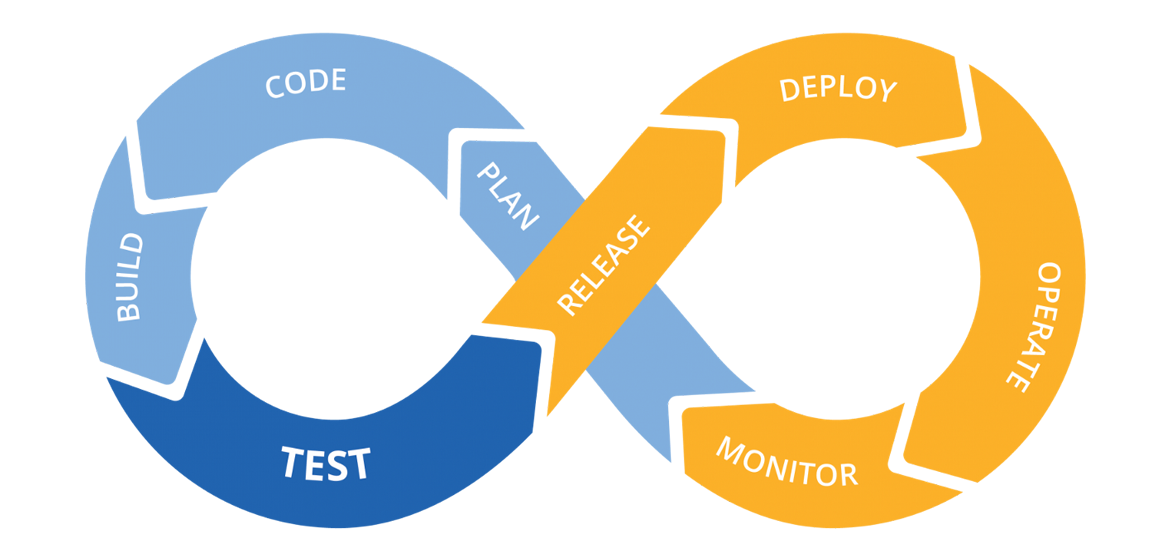
Continuous integration and continuous delivery (CI/CD) are one of the driving forces behind DevOps. But what does it really mean and why is it so critical?
Continuous integration and continuous delivery (CI/CD) is one of the driving forces behind DevOps. If your organization is considering a DevOps approach, CI/CD will be part of it. But what does it really mean and why is it so critical? To strategize about your DevOps toolkit and rollout with IT, understanding the basic concepts of CI/CD is key. In this article, we’ll explore the pain points CI/CD addresses, the tools you’ll need, and the benefits you can expect.
Let’s start with the big picture. DevOps aims to create a workflow from left to right with as little handoffs as possible and fast feedback loops (for an introduction to DevOps, please refer to our previous article). But what does that mean? Work, in our case code, should move forward (left to right) and, if possible, never back to be fixed again. Problems should be identified and fixed when and where they were introduced. For that to happen, developers need fast feedback loops. Feedback is provided through fast automated tests that will validate if the code works as it should before moving it to the next stage.
To decrease handoffs, small groups will work on smaller functionalities (versus an entire feature) and own the entire process: create the request, commit, QA, and deploy — from Dev to Ops or DevOps. The focus is on pushing small pieces of code out quickly. Why? Because the smaller the change going into production, the easier it is to diagnose, fix, and remediate.
This fast flow from left to right is enabled by continuous integration (CI) and extended to actual production deployment by continuous delivery (CD). We see this often referred to as CI/CD. That’s the 10,000-foot view, now let’s dive deeper.
Continuous Integration
In the traditional software development process, multiple developers produce code, and only towards the end of a release do they consolidate their work. This caused many bugs and issues, which could only be identified and resolved after a long testing phase. Until all those issues were resolved, the software could not be released. This hurt software quality, and meant that teams could typically only release new versions once or twice a year.
Continuous Integration (CI) was designed to solve this problem and support agile development processes. CI means that any changes developers make to their code are immediately integrated into the master branch of the software project. The CI system automatically runs tests to catch quality issues, and developers get quick feedback and can fix issues immediately. Developers often commit to the master branch or work on a short-lived feature branch, and a feature is not considered complete until it is integrated with other code changes in the master branch.
In a CI process, a build server is responsible for taking new code changes, running automated tests using multiple tools, integrating the code into the master branch, and generating a build—a new version of software artifacts needed to deploy the software.
CI greatly improves the quality and speed of software development. Teams can create more features that provide value to users, and many organizations now release software every week, every day, or multiple times a day.
Continuous Delivery
Traditionally, deploying new software versions has been a large, complex and risky task. After the new version was tested, the operations team was tasked with deploying it into production. Depending on the size of the software it could take hours, days or weeks, requires detailed checklists and many manual steps, and special expertise. Deployments often failed and required developer workarounds or urgent assistance.
There are many problems with this traditional approach—it is stressful for the team, expensive and risky for the organization, and causes bugs and downtime in production environments.
Continuous Delivery (CD, also known as CDel) aims to solve these problems through automation. The CD approach allows teams to package software and deploy it to production environments with the push of a button. The basic principle of CD is that any change to a software project can be deployed to a production environment immediately, without any special effort.
After the CI system consolidates the new changes and creates a new build, the CD system packages the new version, deploys it to a test environment, automatically evaluates its behavior, and pushes it to the production environment. This last step can be manually approved, but no manual action is required to deploy the new version to production.
Implementing CD requires automating the entire software development lifecycle, including build, test, environment setup, and deployment. All artifacts must reside in a source code repository, and an automated mechanism is required to create and update the environment.
A true CD pipeline has great advantages. It allows development teams to deliver value to customers quickly and create truly agile development processes.
What Are the Stages of a CI/CD Pipeline?
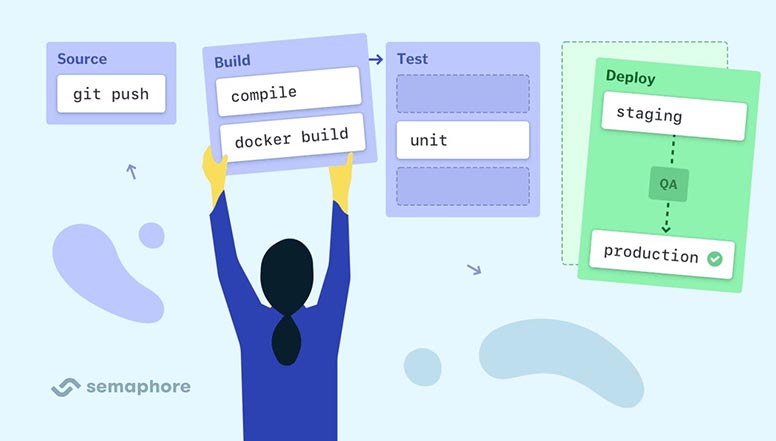
The CI/CD pipeline performs continuous integration, delivery, and deployment in four phases—source, build, test, and deploy.
Source
Creating source code is the first phase in a CI/CD pipeline. During this phase, developers translate requirements into functional algorithms, features, and behaviors. Tools often vary, depending on the project, the project’s language, and other variables. As a result, there is no uniform source creation pipeline.
A source code creation pipeline may incorporate any of the following:
A programming framework, such as Java, .NET, C#, or PHP. An integrated development environment (IDE) that supports the programming language chosen for the project. Code-checking tools, such as vulnerability scanners, basic error detection, and tools verifying adherence to coding standards. Code repositories and version control systems, such as Git.
Build
The build phase involves pulling source code from a repository, establishing links to libraries, dependencies, and modules, and building these components into an executable (.exe) file. It typically requires tools that can generate execution logs, denote errors to correct and investigate, and notify developers once a build is completed.
Build tools vary according to the programming language. Some scenarios may require a specific build tool, while others can employ the same IDE for both source and build phases. A build phase may use additional tools to translate an executable file into a deployable or packaged execution environment, such as a virtual machine (VM) or a Docker container.
Test
During the source code creation phase, the code undergoes static testing. The completed build enters the next CI/CD phase to undergo dynamic testing, including:
Basic functional or unit testing—helps validate new features work as intended. Regression testing—helps ensure changes do not break previously working features. In addition to functional and regression tests, the build undergoes tests that verify integration, performance, and user acceptance. If errors occur during the testing phase, the process loops these results back to developers for analysis and remediation. Since builds undergo many tests, developers employ automated testing to minimize human error and improve productivity.
Deploy
After a build passes the testing phase, it becomes a candidate for deployment. There are two main ways to deploy the build, including:
Continuous delivery—the build is sent to human staff for approval and then deployed. For example, new versions are automatically deployed to a test environment, but promotion to production is gated by a manual approval or merge request. Continuous deployment—the pipeline automatically deploys the build to testing, staging, and production environments, assuming it passes all relevant tests, with no manual approvals.
A typical deployment phase creates a deployment environment and moves the build to a deployment target, like a server. You can automate these steps with scripts or workflows in automation tools. Most deployments also integrate with error reporting and ticketing tools to detect unexpected errors post-deployment and alert developers.
What are the benefits of CI/CD?
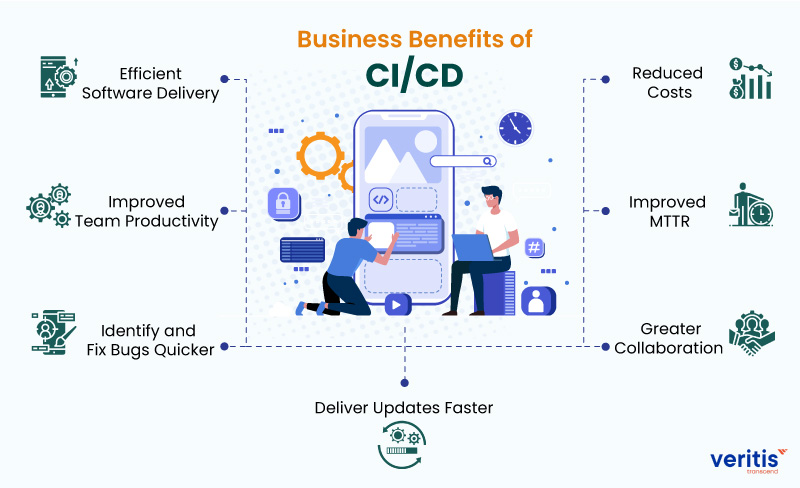
Easy to Debug and Change: It is easier to debug and change the codes when small pieces of code are continuously integrating. We can test these pieces while continuously integrating them with the code repository. Release and Delivery Speed Increases: With CI/CD, the speed of release and delivery is increased along with the development. Releases become more frequent and reliable.
Increased Code Quality: The code's quality increases as the code can be tested every time we integrate it with the code repository. The development becomes secure and more reliable. Also, CI/CD pipeline automates the integration and testing work, and more time use to increasing the code quality.
Reduces Costs: It automates the development and testing process, reducing the effort of testing and integration. Reduce the errors with automation, and it saves the time and cost of the developers. This save time and cost to increase the code quality.
Increased Flexibility: With CI/CD, the errors are found quickly, and the product can be released more frequently. The flexibility to add new features increases. With automation, one can adopt new changes quickly and reliably.
CI/CD Security Risks
Supply Chain Attacks
A supply chain attack is a cyber attack that targets weak links in an organization’s supply chain. A supply chain is the network of all individuals, organizations, resources, activities, and technologies involved in creating and selling software products.
Modern software applications rely heavily on dependencies to provide their core functionality. The software ecosystem relies heavily on CI/CD to publish source code and binaries to public repositories. This allows attackers to bypass standard security measures and directly attack the supply chain, infecting many applications and websites simultaneously.
Insecure System Configuration
A CI/CD environment consists of several systems from various vendors. To optimize CI/CD security, security teams must focus on the health and resilience of individual systems and the code and artifacts flowing through the pipeline.
Like any other system that stores and processes data, a CI/CD system includes a variety of security settings and configurations at the application, network, and infrastructure levels. These settings have a significant impact on the security posture of a CI/CD environment and its vulnerability to potential breaches. Attackers are on the lookout for ways to exploit potential CI/CD vulnerabilities and misconfigurations.
Insecure Code
The demand for rapid software development and delivery has increased the use of open source third-party integrations. Some teams may bring third-party integrations into their deployments without properly scanning the source code for security vulnerabilities. Such integrations could lead to vulnerabilities in the CI/CD pipeline. Developers may not follow code security best practices, increasing the attack surface. Common code vulnerabilities include user input vulnerabilities, buffer overflows, error handling errors, and serialization issues.
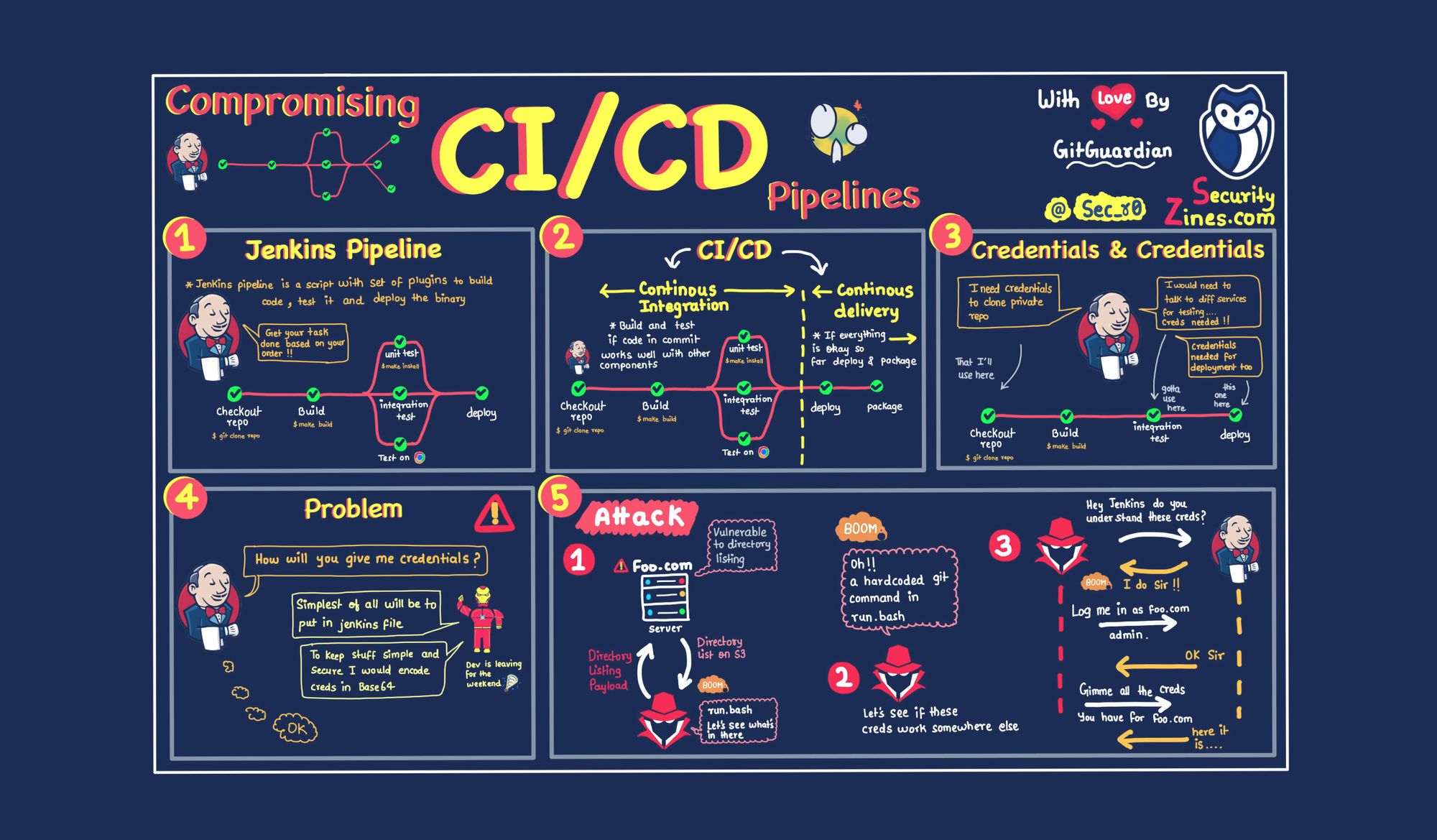
Exposure of Secrets
Automated processes are a key component of any DevOps infrastructure. CI/CD orchestration and configuration tools are increasingly being deployed into DevOps processes to automate processes and facilitate rapid deployment of software releases.
However, CI/CD tools make extensive use of secrets (like passwords and API access tokens). they access many sensitive resources, such as information from other applications and services, code repositories, and databases. The more secrets you have, the more difficult it is to securely store, transmit, and audit them.
Also, secrets are not only used for tool-to-tool authentication. In many cases, confidential information must be provided during the build and deployment process so that deployed resources can access it. This is especially important when deploying microservices using the auto-scaling capabilities of tools like Kubernetes.
Conclusion
CI/CD is among the best practices for the DevOps teams to implement using DevOps Assembly Line. Additionally, it's a unique methodology for the agile enterprise that facilitates the development team to achieve the business requirements, best code quality, and security because deployment steps are automated.